Specula app icon

Version 1.2

Specula

Audio analysis and repair for macOS. Load a file and see what's in it: LUFS and true peak against the streaming and broadcast targets, speech-gated dialog levels, the spectrum, and the phase between channels. Compare up to six masters, level-matched and sample-aligned, down to the A−B residual. Then fix what you find: trim and normalize, paint a cough out of the spectrogram, punch in a corrected line, or run your Audio Unit chain with the meters live.

macOS EBU R128 ITU-R BS.1770-4 Speech-gated LUFS Dialogue regions A/B compare Audio Unit plugins Spectral editing Record mode Signal generator

7-day trial · one-time purchase · macOS 14+

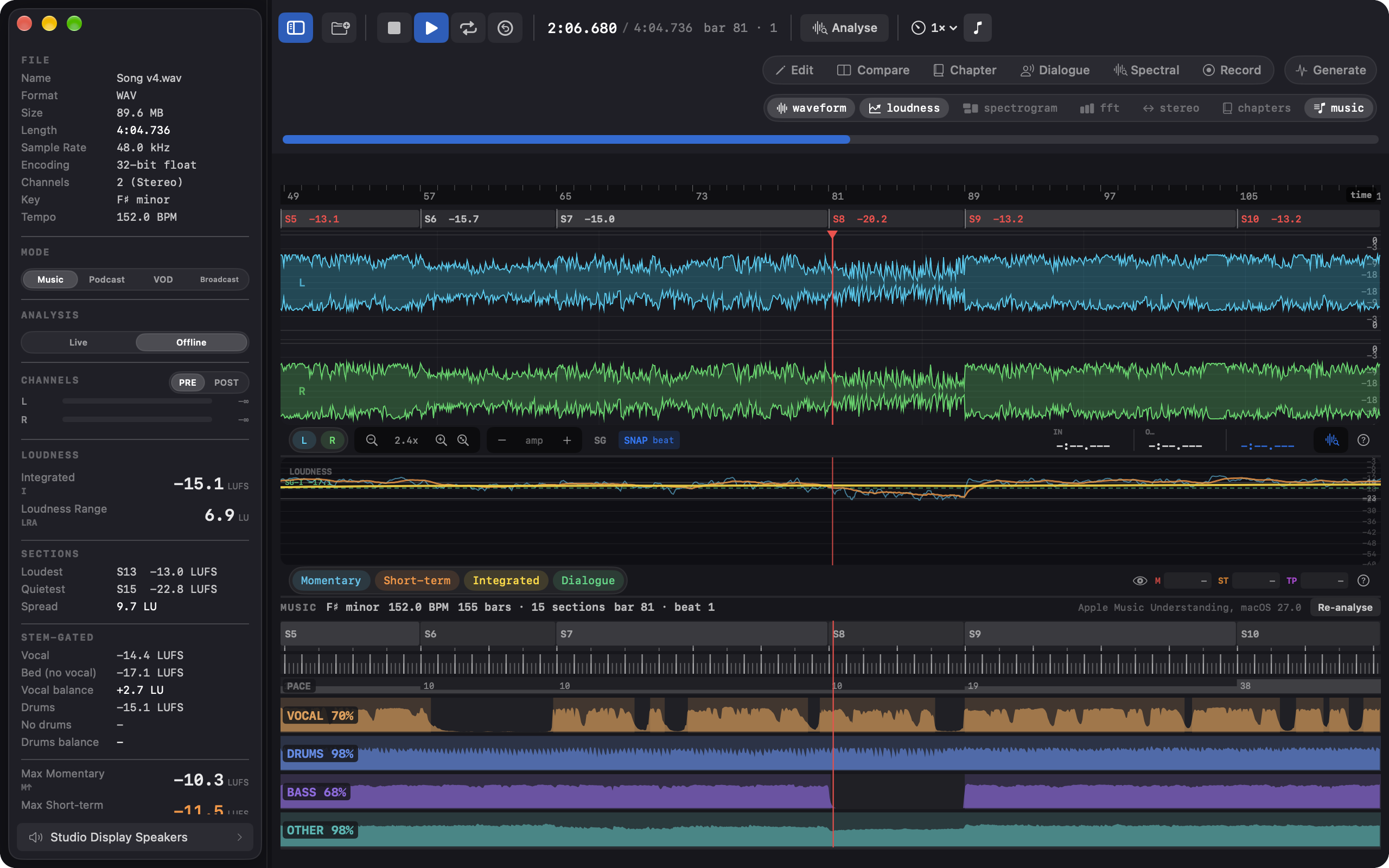
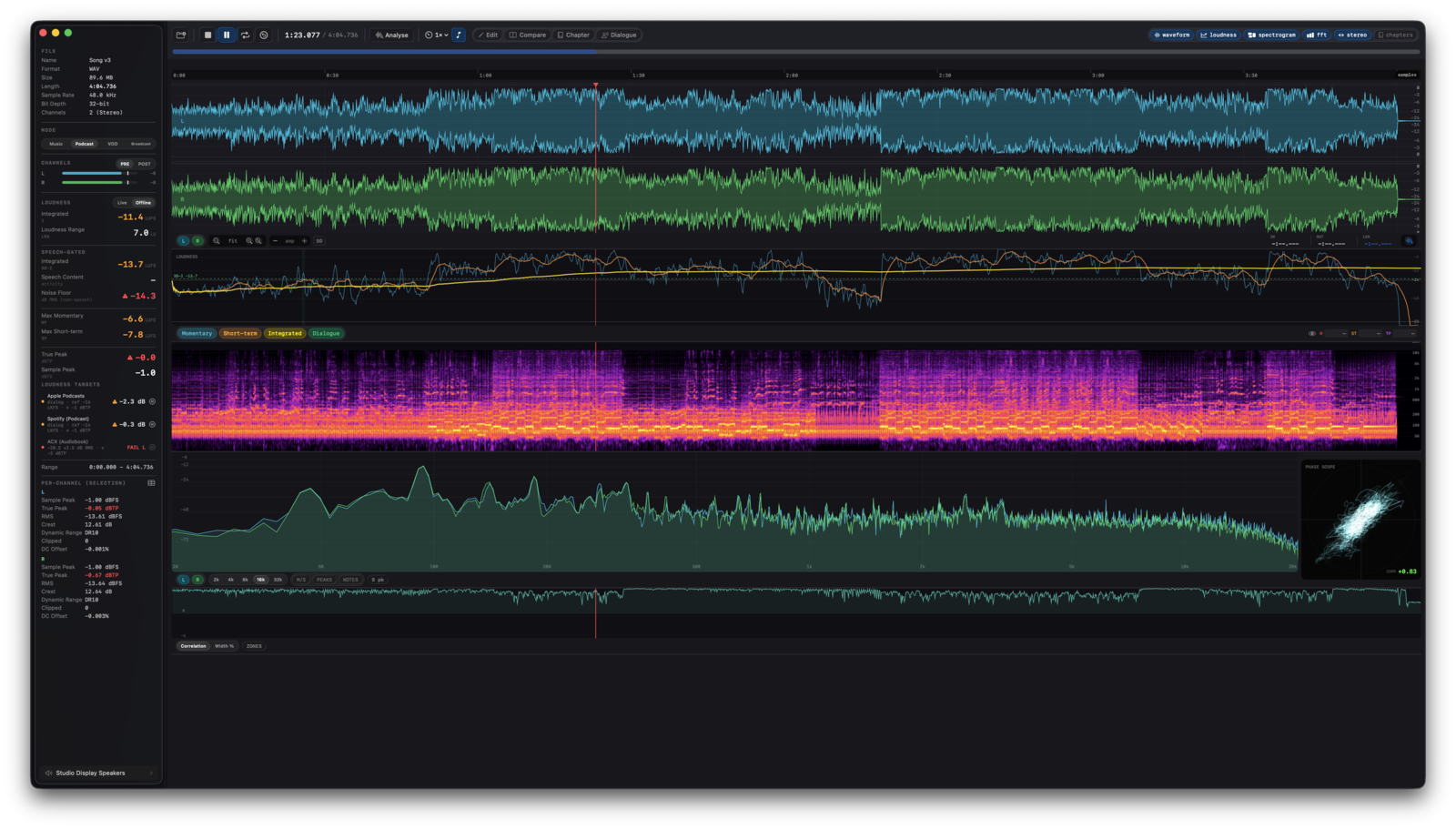
Specula's main window analysing a stereo master: stacked waveform, inferno spectrogram, loudness curve, FFT spectrum, and a Lissajous phase scope.
A loaded master. Waveform, spectrogram, loudness curve, FFT, and phase scope on a single file.

22

delivery targets across music, podcast, VOD, and broadcast

6

masters compared at once, level-matched and sample-aligned

4×

oversampled true peak, enforced against the inter-sample peak

−60 dB

live ACX noise-floor check on the room, before the take

Live meter

The standard itself, running in this page.

Below is a working BS.1770-4 meter. The page synthesizes a 30-second program - verse, quiet passage, loud chorus, verse, fade - and meters it as it plays: K-weighted momentary and short-term, gated integrated loudness, true peak at 4× oversampling. Specula runs the same standard natively, on your files.

BS.1770-4 · 48 kHz · 30 s generated program
0 −12 −24 −36 verse quiet chorus verse fade 0:00 0:10 0:20 0:30 target −14.0

Integrated

−14.7 LUFS

−0.7 LU vs −14.0

Short-term 3 s

−21.5 LUFS

Momentary 400 ms

−53.6 LUFS

True peak

−1.2 dBTP

sample peak −2.2 dBFS

What to watch. The quiet passage drops short-term by 10 LU and integrated barely moves: blocks more than 10 LU under the running mean fall out of BS.1770's relative gate. True peak ends a decibel above sample peak - the inter-sample overshoot that only shows up once the 4× oversampler looks between samples. Playback runs at 2×.

New in 1.2

1.2 opens two doors: your own delivery spec as a first-class compliance target, and audio that arrives with no header at all.

Custom loudness targets put a house spec next to the platform presets. Give it a name, a mode, a measurement source (integrated, dialog-gated, or un-weighted RMS), a reference level, a tolerance band, and a true-peak ceiling. It then works everywhere a built-in target does: the verdict badge, the hover breakdown, Match, Normalize to target, and the report exports. Delivering at -18 LUFS ±1 under -1 dBTP stops being mental math against the nearest streaming preset. Loudness targets guide →

Raw PCM import opens headerless audio: a dump from a decoder under test, an I2S capture, a .bin of samples from a test harness. Declare the sample rate, channels, sample format, byte order, and layout, and the whole analysis stack applies. The sheet checks the file size divides into whole frames, ranks the byte formats that fit by decoding a few seconds of each, and previews the result with playback before you commit. It never guesses the sample rate, because nothing in a headerless file can reveal it and a wrong rate corrupts every number without an error. The same declaration works on the command line. Raw PCM guide →

1.2 also brings a readability pass: Text size scales the whole main window, the info panel honors the system Increase Contrast setting, and the live Momentary and Short-term readouts get a refresh-rate picker and a separate rolling-digits toggle. Plus zoom resets across the waveform, FFT, and Spectral canvas, and fixes to short-file spectrograms and high-zoom loudness curves. The release notes have the full list.

Specula's New Custom Target sheet: fields for name, mode, measurement source, reference level in LKFS, tolerance in LU, and true-peak ceiling in dBTP, above a sentence spelling out the pass condition the verdict will use.
Custom loudness targets. A reference, a tolerance, and a ceiling; the sheet spells out the pass condition before you save it.
Specula's Open as Raw PCM sheet for a headerless file: sample rate, channels, sample format, byte order, interleaved or planar layout, header skip and trailing tolerance, a green frame count and duration, a Rank likely formats button, and a decoded waveform preview with a plausibility score.
Raw PCM import. Declare the format, watch the frame count and the preview agree, then open. The sample rate is never guessed.

Why Specula

Specula shows what's in the file, in numbers and in pictures, before it ships.

Monitors won't flag what delivery QC will: integrated LUFS half a dB over Spotify's target, a dialog mix four LU under Netflix's speech-gated number, a polarity flip in one channel that nobody caught on headphones. Those numbers are already in the file. Specula reads them out.

Comparison has the same blind spot. Was rev 4 better than rev 3, or just half a dB louder? Specula loads up to six versions, normalises them by integrated LUFS, optionally inverts polarity, and computes a sample-accurate residual: everything that differs between two takes, audible on its own.

Before a file leaves the studio, one window confirms the loudness, the true-peak ceiling, the platform compliance, the phase, and the spectral content of the master you're actually sending.

The pipeline

master.wav mono to 7.1 BS.1770-4 · M / S / I / LRA true peak · 4× oversampled FFT spectrum · spectrogram Silero VAD · speech-gated LUFS correlation · phase scope 22 delivery targets penalty or pass / fail JSON · PDF · CLI for scripts and CI master.wav mono to 7.1 BS.1770-4 · M / S / I / LRA true peak · 4× oversampled FFT spectrum · spectrogram Silero VAD · speech-gated LUFS correlation · phase scope 22 delivery targets penalty or pass / fail JSON · PDF · CLI for scripts and CI
The analysis pass. A loaded file fans out into the five paths; verdicts and reports read from that same pass, in the window or from a script.

Built for your workflow

Nine jobs · one engine

Nine entry points into the same engine. Find your job.

Spoken-word work is where Specula goes deepest

Neural speech detection you can hand-correct, dialog-gated targets for every major platform, and per-chapter ACX scoring.

Everything it measures

Every measurement, on every file you load. Live during playback, offline on any selection.

Waveform

All channels, pinch-zoom, drag-select, click-to-seek, clip detection, dBFS grid.

EBU R128

Momentary, Short-term, Integrated, LRA, True Peak, all live.

Loudness targets

Per-platform gain penalties for streaming, hard pass/fail for VOD and broadcast.

Speech-gated LUFS

Silero neural VAD highlights speech blocks for dialog mixes.

FFT spectrum

Five window types, note-name on hover, frequency-range selection.

Spectrogram

Four colormaps, log or mel scale, configurable dB range and time resolution.

M/S stereo width

L/R correlation meter, zone colour mode, plain-language hover labels.

Phase scope

Lissajous L/R correlation.

Per-channel RMS

Peak hold, colour-coded zones, per-channel mute.

Selection analysis

Full offline pass with per-channel peak / RMS / crest.

Loudness violations

Set M/S/TP thresholds, watch the waveform light up.

Plugin chain

Audio Unit effects in Edit mode, metered live, rendered as an undoable edit.

Spectral editing

Select time-frequency regions on the spectrogram; attenuate, erase, or repair.

Record mode

New, append, insert, or punch takes with live loudness and noise-floor meters.

Signal generator

Tones, noise, impulses, sweeps; stacked per channel; WAV / AIFF / CAF.

Channel routing

N→M output matrix, mixdown presets, PRE/POST metering, render to file.

Variable-rate playback

0.25× to 2× with optional pitch preservation.

JSON & PDF reports

Pick what to include, export and archive.

Format support

WAV, AIFF, FLAC, CAF, MP3, AAC; mono through 7.1+ layouts.

specula CLI

analyze, compare, edit, generate, report; JSON / HTML / PDF output.

Shortcuts + Siri

Eight App Intents with chainable measurement and comparison entities.

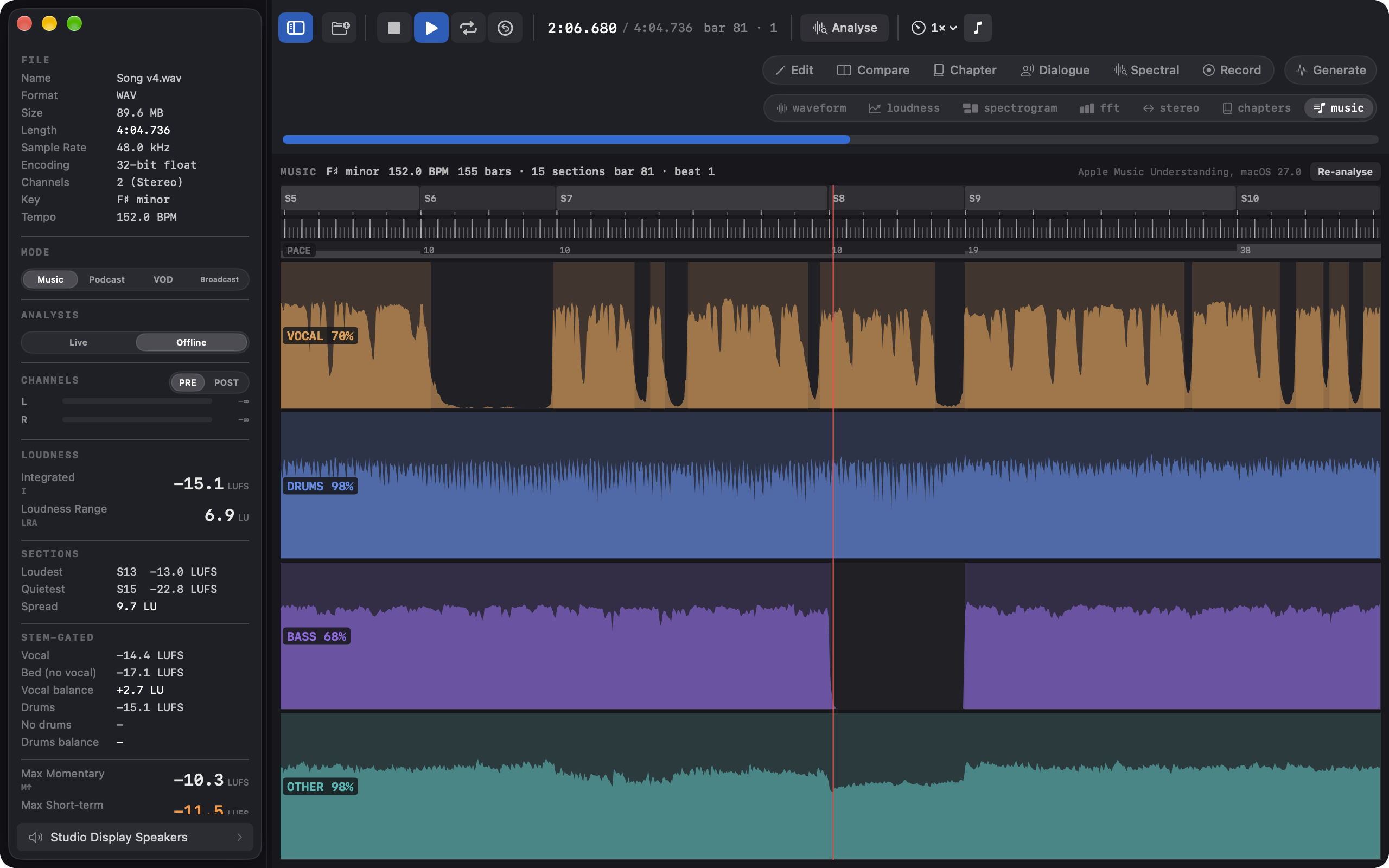
Specula spectrogram view with the inferno colormap on a log frequency scale.
Spectrogram. Four colormaps, log or mel scale, with separate live and offline stores.
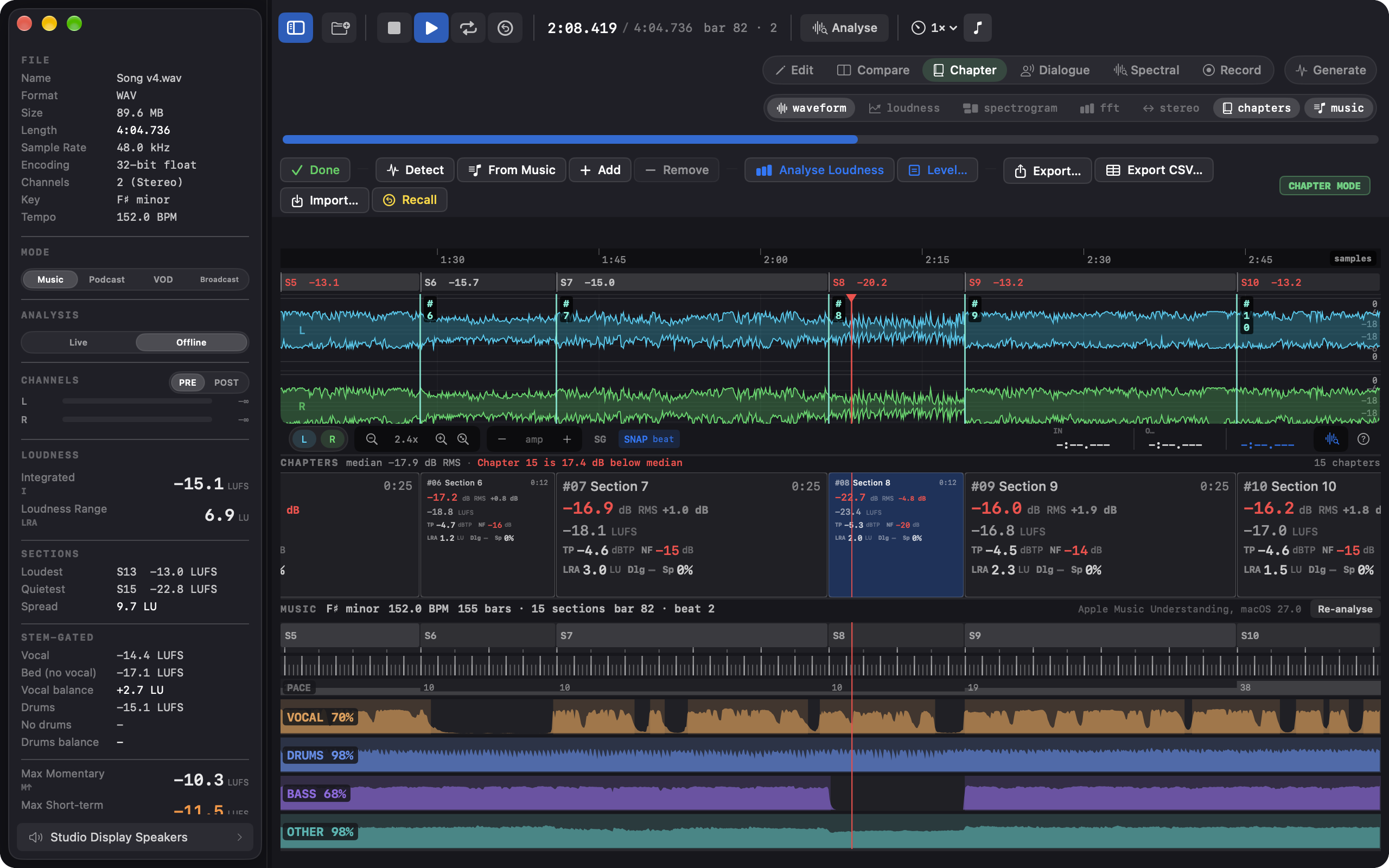
Stereo-width readout across a master, coloured by zone from mono to out of phase.
Stereo width. Left/right correlation over time, with plain-language zone labels.
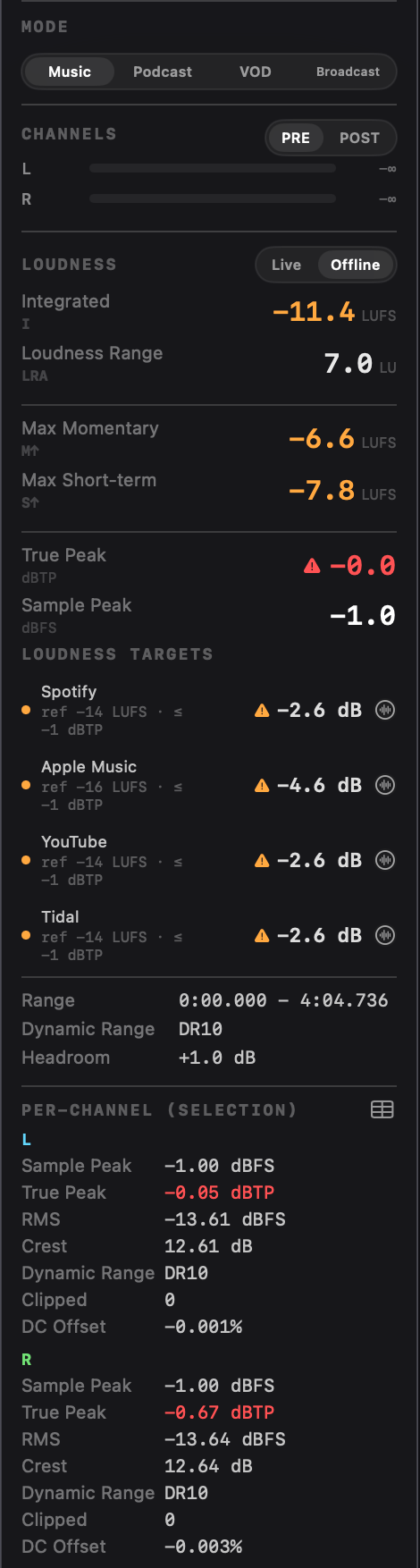
Specula loudness sidebar: integrated LUFS, max momentary and short-term, loudness range, true peak and sample peak.
Live loudness. EBU R128 momentary, short-term, integrated, LRA, and 4× oversampled true peak.

The whole app, subsystem by subsystem

What each FFT window is for, how the speech-gated path works, how compare-mode auto-align locks two files together, and the complete keyboard map.

Open user guide →

From the terminal

The same engine ships as a CLI. Five subcommands, analyze, compare, edit, generate, and report, return the numbers the app shows, as deterministic sorted-key JSON. Install it from Specula → Install Command-Line Tool…

specula
$ specula analyze master.wav
$ specula compare revA.wav revB.wav --match-loudness --out-diff residual.wav
$ specula report mix.wav --mode music --format pdf --out report.pdf

Batch QC, CI hooks, and the eight App Intents are covered in the automation workflow; the full flag reference is in the user guide.

In depth

EBU R128 loudness
Full ITU-R BS.1770-4: K-weighting, 100 ms gating blocks, dual gating (−70 LUFS absolute, −10 LU relative), 4×-oversampled true peak. Momentary, Short-term, Integrated, LRA, and True Peak run live in the sidebar; offline integrated and LRA on any selection. Validated against the EBU R128 loudness test set (Tech 3341/3342).
Speech-gated LUFS
A neural Silero VAD runs on every loaded file, highlights speech blocks in teal on the waveform, and gates a parallel integrated measurement. Netflix's speech-gated target (−27 LKFS ± 2) becomes a number you read off the panel.
FFT spectrum
Real-time logarithmic spectrum with five window functions (Hann / Hamming / Blackman / Blackman-Harris / Flat Top), each tuned for a different job. Hover anywhere on the curve to read frequency, level, and the closest musical note with cents deviation.
Spectrogram
Four perceptually-distinct colormaps (Inferno / Turbo / Plasma / Viridis), logarithmic or mel frequency scale, configurable dB range, and five overlap settings from ~47 to ~750 columns per second at 48 kHz. Live and Offline stores stay separate, so playback never overwrites an Analyse result. While paused, clicking the waveform recomputes the FFT for that position.
M/S stereo & phase
A correlation curve (−1 to +1) plus a Lissajous phase scope. Zone colour mode tints the curve by stereo character, from mono to out-of-phase, with a plain-English hover label.
Compare mode (⌘2)
Six slots (A-F), switched on bare 1-6 keys. One-click LUFS level matching, per-slot polarity invert, editable offset and gain fields, and two-pass cross-correlation auto-align that locks a slot to A at the exact sample. Listen to Diff (D) plays the cached A−X residual in place of the slot; ⌃⌘E exports it to WAV.
Edit mode (⌘1)
Trim, cut with crossfade joins, insert silence, gain, fades, phase invert, DC removal, channel swap or split to mono files. Normalize to a peak or LUFS target with a 5 ms lookahead limiter enforced against the oversampled inter-sample peak; Limit TP caps a true-peak overage on its own; Level Dialogue pulls room tone down between phrases. Normalize and Limit TP respect a time selection. 16-level undo; always saves a new file.
Chapter mode (⌘3)
Detect finds the silences and cuts the file into a chapter ribbon; Analyse Loudness runs the full metric set per chapter and flags every gate miss: the three ACX limits plus drift off the book's median. Level chapters brings every chapter to a common RMS or LUFS in one move. The chapter table lands in the PDF report with the same red-cell signalling.
Dialogue mode (⌘4)
Hand-correct what the VAD got wrong: drag, resize, split, add, and delete speech regions, with I/O marking and 50-step undo. The overlay tint says where regions came from: teal fresh from Silero, amber once you've edited, blue when loaded from a sidecar. Edits persist in a versioned .dlg.json sidecar and feed straight into the speech-gated loudness path.
Spectral mode (⌘5)
The canvas becomes a full-resolution, zoomable spectrogram where you select regions in time and frequency with a rectangle, a lasso, a brush, or a wand that grows across the connected region at a similar level. Attenuate, Erase to the surrounding noise floor, or Repair by bridging from the clean audio either side. Solo the selection or hear the result before committing. Any channel count; multichannel beds edit one channel at a time. Spectral repair workflow →
Record mode (⌘6)
Captures from any input device straight into the app, and it is the one mode that works with nothing loaded. A new take, an append, an insert at the playhead, or a tape-style punch over the flubbed word, every join smoothed by an adjustable equal-power crossfade and each landing a single Undo away. Live meters run while armed, including a noise-floor readout for spoken-word specs. Takes stream to disk and open for analysis at Stop.
Audio Unit chain
Edit mode hosts your installed AUv2 and AUv3 effects. Chain several, tune them by ear while every meter tracks the processed sound, then Render bakes the chain in as an undoable, latency-compensated edit, or renders to a Compare slot to A/B against the source with real numbers. Plugins run out of process by default, so a third-party crash can't take the app down.
Signal generator (⌘G)
Builds test files from modules: band-limited tones, white, pink, and brown noise, impulses, and linear or logarithmic sweeps, stacked or sequenced per channel, with per-module fades, level sweeps, and burst gating. Writes WAV, AIFF, or CAF at 16 or 24-bit integer or 32-bit float, with a live waveform and spectrum preview. Also on the command line as specula generate.
Custom loudness targets
Your own delivery spec as a compliance target: a name, a mode, a measurement source (integrated, dialog-gated, or un-weighted RMS), a reference level, a tolerance band, and a true-peak ceiling. It joins its mode's list and works everywhere a built-in target does, including Match, Normalize to target, and the report exports.
Raw PCM input
Headerless audio under a format you declare: sample rate, channels, sample format from 8-bit unsigned to 64-bit float including packed 24-bit, byte order, interleaved or planar, an optional header skip. The import sheet ranks the byte formats that fit and previews the decode; the sample rate is never guessed. Declarations are remembered per file and savable as presets, and the same flags work on analyze, report, and edit.
Channel routing
A dedicated Output window (⌥⌘O) with an N→M matrix, per-route gain and polarity, and mixdown presets following ITU-R BS.775-3 and Dolby PLII. Metering reads PRE (the raw file) or POST (after routing), so you can verify a channel order or audition a downmix. Render to File… writes only the routed outputs, never over the source.
JSON & PDF reports
⇧⌘E writes JSON, ⌥⌘E writes PDF, both populated with the full metric grid the moment a file has loaded. The JSON schema is stable for archival and CI, and each loudness-target row carries an inline verdict object so a script can branch on pass/fail.
Format support
WAV, AIFF, FLAC, CAF, MP3, AAC, and anything else AVFoundation decodes. Mono and stereo through 3.0, quad, 5.1, 7.1, and arbitrary n-channel layouts.
Loudness targets

Four delivery modes, twenty-two platforms and standards. The gain each will apply to your master, or a hard pass/fail against the spec.

Music mode shows the streaming penalty rather than a verdict. A master at −10 LUFS reads "Spotify −4 dB"; that's the exact gain Spotify will apply at playback to hit its −14 LUFS reference. The dot is green within ±1.5 dB of zero, yellow within ±4 dB, orange beyond, and a separate triangle lights when the true peak breaches the platform's ceiling.

Quiet masters get the honest readout. Apple Music's Sound Check, YouTube, and Tidal are down-only: a −18 LUFS master plays at −18, and the panel reads "as-is" in green instead of promising a boost that won't come. Spotify, Amazon Music, Deezer, and SoundCloud do boost quiet tracks, and there the +X dB number is real.

VOD and Broadcast modes are hard pass/fail: a green dot means loudness sits inside the tolerance band and true peak is at or below the ceiling. FAIL L marks a loudness band miss, FAIL TP a true-peak overshoot, FAIL S↑ a max-short-term overshoot (EBU R128 S1's tighter short-form spec), FAIL NF an ACX noise-floor breach. When several gates fail at once, the loudness miss is the one named first.

Dialog-gated targets (Netflix, Prime Video, Apple TV+, Disney+, Max; Apple Podcasts, Spotify Podcasts; ATSC A/85) evaluate against the speech-gated path and lead with dialog · in the panel. A file with no detectable speech is labelled "no speech" rather than scored against a gate it can't meet. Pick up to four targets per mode in Settings → Targets.

Match to target is non-destructive audition: press a target row's toggle and playback shifts to that target's level with a true-peak limiter at the spec ceiling. Press it on Netflix and hear the file the way Netflix will play it; release, and unity gain returns. Normalize commits instead: one uniform gain to land the target, a two-pass limiter to hold the ceiling, saved as a new file. When only the true peak is over, one-click Limit TP caps the inter-sample peaks without touching loudness.

For audiobooks, the common ACX rejection is room tone above the −60 dB RMS ceiling. Specula shows a live Noise Floor readout over every non-speech sample, and the ACX preset scores it as part of the verdict: above −60 dB, the target lights FAIL NF. Chapter mode runs the full ACX set per chapter; the audiobook workflow has the details.

MusicSpotify · Apple Music · YouTube · Tidal · Amazon · Deezer · SoundCloud · AES TD1008
PodcastApple Podcasts · Spotify Podcasts · ACX
VODNetflix · Prime · Apple TV+ · Disney+ · Max · all −27 LKFS dialog-gated
BroadcastEBU R128 · R128 S1 short-form · ATSC A/85 (CALM) · ARIB TR-B32 · OP-59

The panel tracks playback live. For a broadcast delivery you'll usually want the offline analysis (⌘Return) so the verdict covers the entire master, not a rolling estimate. Every target's reference, tolerance, and true-peak ceiling is listed in the user guide.

Standards

Specula implements the actual specifications, not approximations of them.

EBU R 128 loudness logo EBU R 128
loudness compliant
ITU-R BS.1770-4K-weighting filter (two cascaded biquad IIR sections), 100 ms gating blocks, dual gating (−70 LUFS absolute, −10 LU relative), 4× oversampled inter-sample peak detection.
EBU R128Momentary (400 ms window), Short-term (3 s window), Integrated (gated whole-programme), LRA (10-95 percentile range), True Peak (dBTP). Loudness validated against the EBU R128 loudness test set (Tech 3341/3342).
Silero VADNeural voice activity detection (MIT). Runs at 16 kHz on every loaded file, classifies speech/non-speech per 100 ms block, and feeds the speech-gated loudness path.
FluidAudioApache 2.0 Swift wrapper for Silero on Apple platforms. The model ships inside Specula, so speech-gated analysis runs fully offline with no download.

Requirements

macOS
Sonoma 14.0 or later.
Hardware
Any Mac that runs macOS 14. Apple Silicon recommended for large files; uses Apple's vDSP throughout.

All audio is processed locally. Specula never transmits your audio anywhere.

FAQ

Can I script Specula from the terminal?

Yes. The specula CLI has five subcommands (analyze, compare, edit, generate, report) built on the same engine as the app, with deterministic sorted-key JSON output. Install it from Specula → Install Command-Line Tool…, which links it into /usr/local/bin. The full command reference is in the user guide.

Does Specula work with Shortcuts?

Yes: eight App Intents (Get Measurements, Compare Files, Get Compare Diff, Get Report, each in a file-input and a path-input variant) return structured output that chains into later Shortcut steps. Spotlight phrases like "Measure with Specula" register automatically, and path variants accept quotes, tildes, and file:// URLs.

Can I get a PDF report without opening the app?

Yes: specula report mix.wav --mode music --format pdf --out report.pdf from the terminal, or the Get Report Shortcut action with Format set to PDF. Both match the app's PDF preview; HTML and JSON come from the same --format flag.

Do I have to run an offline selection analysis for every file?

No. The full-file report populates every metric the info panel shows the moment the file finishes loading. ⌘Return selection analysis is for when you want the numbers for a specific region.

What's the difference between Match and Normalize on a loudness target?

Match is a non-destructive playback gain: you hear the file the way the platform plays it, and releasing the toggle restores unity. Normalize commits: it opens Edit mode pre-filled to the target, shifts the whole file by one uniform gain, holds the dBTP ceiling with a two-pass true-peak limiter, and saves a new file. The one exception is the ACX RMS target, which stays compliance-only: ACX has a noise-floor requirement a gain can't satisfy.

Can Specula fix my ACX noise floor, or level my chapters?

Within limits. Level Dialogue drops the room tone between phrases before any makeup gain, so the floor ends up lower. It's a gate, not a denoiser: the floor has to be close to passing already. For chapter-to-chapter consistency, Level chapters levels the whole book in one move. See the audiobook and editing workflows.

Does Specula have keyboard shortcuts?

Edit mode has a full set, active only in Edit mode and listed in the Edit menu: Cut, ⌘T Trim, ⌘F / ⌥⌘F fades, ⌃↑ / ⌃↓ gain, and more. The transport keys work everywhere. The complete map is in the keyboard reference.

Can I use my own plugins in Specula?

Yes, in Edit mode: chain Audio Unit effects installed on your Mac, reorder, bypass, and open each plugin's own window while every meter tracks the processed sound. Render bakes the chain in as an undoable, latency-compensated edit; Render to Compare Slot sets up an A/B against the source. See the Edit mode guide.

Which plugin formats does Specula host? Does it load VST?

Audio Units only (AUv2 and AUv3); VST and VST3 aren't loaded. Most macOS effect plugins install an AU alongside their other formats, and those show up in the Add browser, grouped by manufacturer. Instruments aren't listed, since the chain processes an existing file. AUv3 plugins run out-of-process, so a crash in one can't take Specula down.

Is Specula a native Mac app?

Yes. Swift, AVAudioEngine, and Metal for the spectral canvas, not a web view in a desktop frame. Right-clicking audio in Finder gets three Services, Shortcuts and Spotlight get App Intents, and on macOS 26 the chrome is Liquid Glass, with an opt-out to solid chrome in Settings → Layout.

Can Specula remove a cough or a chair squeak from a recording?

Yes, in Spectral mode (⌘5): draw around the blemish on the zoomable spectrogram with the rectangle, lasso, brush, or wand, then Attenuate, Erase, or Repair it. Space, ⇧Space, and ⌥Space audition the span, the selection alone, and the result before you commit, and everything outside the selection stays untouched. See the spectral repair workflow.

Does recorded audio stay on my Mac? Why the microphone permission?

Record mode captures from your input device, so macOS shows its standard permission prompt on first entry (⌘6). Takes are written to your Mac and nowhere else; analysis runs on-device, and the app's only outbound connections (update checks, license validation) carry no audio. Unsaved takes sit in ~/Library/Application Support/Specula/Recordings for seven days. See the privacy policy.

Can Specula generate test tones, sweeps, or pink noise?

Yes: the Signal Generator (⌘G) builds band-limited tones, white / pink / brown noise, impulses, sweeps, and silence, stacked or sequenced per channel, and writes WAV, AIFF, or CAF, or loads the result straight into the main window. The same generator runs as specula generate, with a --spec-file JSON form for layered multichannel signals. See the Signal generator guide.

Can I render a surround downmix to a file?

Yes: set up the routing in the Output window, then Render to File… writes the routed result to a new file with every gain, polarity, and Pro Logic II phase applied, and only the outputs you've routed (a 5.1 → stereo fold makes a 2-channel file). One honest note: the CLI's edit subcommand doesn't expose routing render; that's app-only. See the surround workflow.

Negative numbers like --gain -3 get rejected by the CLI; why?

A bare leading - parses as an option name, so pass any negative numeric in the --option=value form: --gain=-3, --normalize-lufs=-14. Positive values work either way.

How do I report a bug or send feedback?

Email hello@headroomstudio.dev, or use Help → Send Feedback in the app; both land in the same inbox.

Before you send it

Specula doesn't replace your DAW, your mastering chain, or your ears. It catches what they miss: the hidden phase issue, the half-dB true-peak overshoot, the dialog mix three LU off Netflix's target. Load the file, read the numbers, then send it.

Take the long way through the user guide if you're new to loudness gating, or skim the keyboard reference if you just want to drive it.