Specula app icon

Workflow · Audiobook / ACX

Audiobooks, scored chapter by chapter.

Find every reason ACX would reject your audiobook before you upload it. Specula segments the file into chapters, runs a full loudness pass on each one, and flags RMS, true peak, and the room-tone noise floor against the ACX spec, plus each chapter's integrated LUFS against the book's own median, so a single bad pickup shows up here, not three days later in a rejection email.

macOS ACX spec Chapter mode Speech-gated LUFS −60 dB noise floor Level Dialogue
7-day trial · one-time purchase · macOS 14+

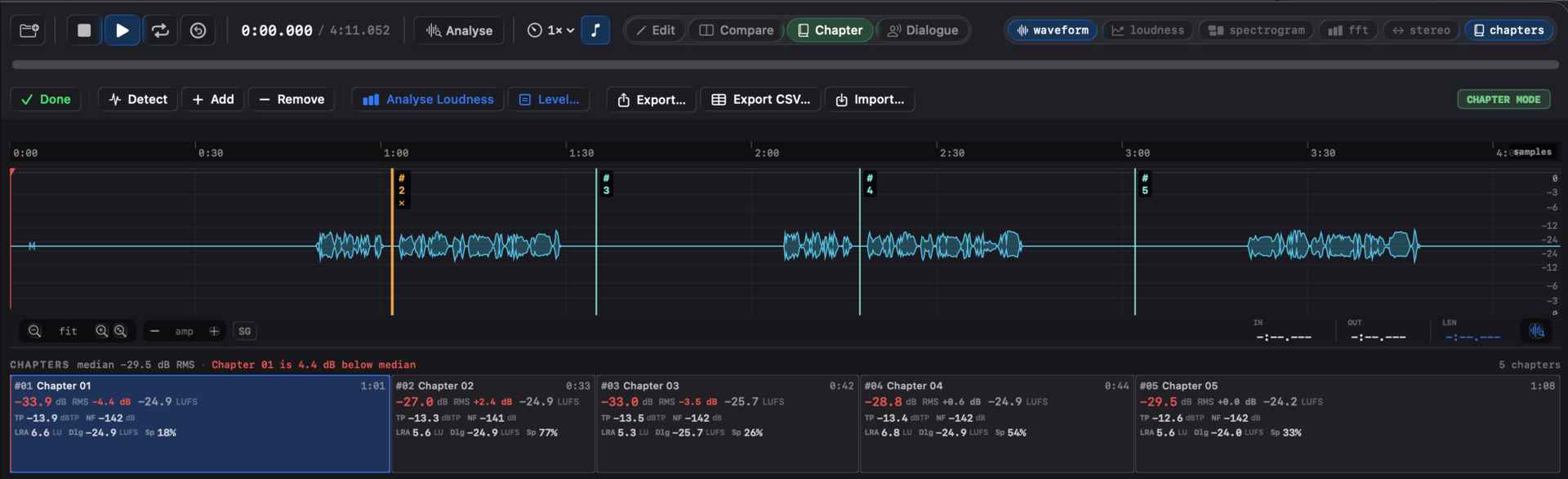
Specula in Chapter mode: chapter markers on the waveform and a per-chapter table with RMS, true peak and noise floor, one chapter flagged red.
Every chapter, checked against ACX. Per-chapter RMS, true peak, and noise floor, with outliers flagged against the book median.

Why ACX rejects audiobooks

ACX checks three things and rejects on any of them. Two are easy to hit; the third is the one that catches people.

Loudness and true peak you can usually eyeball in a DAW. The room-tone noise floor is different: it's inaudible on headphones, invisible on a standard loudness meter, and a common reason an audiobook bounces back. Specula reads all three off the file directly, so the rejection condition is a number on screen instead of a surprise.

ACX RMSRMS between −23 and −18 dB, measured per chapter, not just for the file as a whole. ACX checks plain RMS, not K-weighted LUFS, so Specula evaluates RMS here too.
ACX TPTrue peak at or below −3 dBTP, detected on the 4× oversampled inter-sample peak. Set the TP threshold to −3 dBTP and every block that breaches it lights up on the waveform, so a stray mouth click or page-turn thump is a spot you seek to, not a hunt.
ACX NFRoom-tone noise floor at or below −60 dB RMS, measured over every non-speech sample.

The workflow

Load to receipt in four steps. One file, one pass, every chapter scored.

1 · Load & clean speech
Drop the file; Silero's neural VAD marks every speech block on load. If a breath, a page turn, or a music bed got mislabelled, fix it in Dialogue mode (⌘4): drag a region, mark I / O, split with S, so the noise floor and speech metrics measure the right samples. Edits auto-save to a .dlg.json sidecar and re-apply next time you open the file.
2 · Split into chapters
Chapter mode (⌘3) → Detect splits the file at silences (default 2 s under −55 dB) into a chapter ribbon. Drag any boundary to correct it, click one and Remove to merge two chapters, rename slots, or import a hand-made layout as a JSON sidecar.
3 · Score every chapter
Analyse Loudness runs a full pass per chapter: RMS, integrated LUFS, true peak, sample peak, noise floor, LRA, max momentary / short-term, speech-gated LUFS, speech %. Each chapter is flagged against the three ACX gates (RMS, true peak, noise floor) and against the book's own median (default ±2 LU on the integrated LUFS).
4 · Hand off the receipt
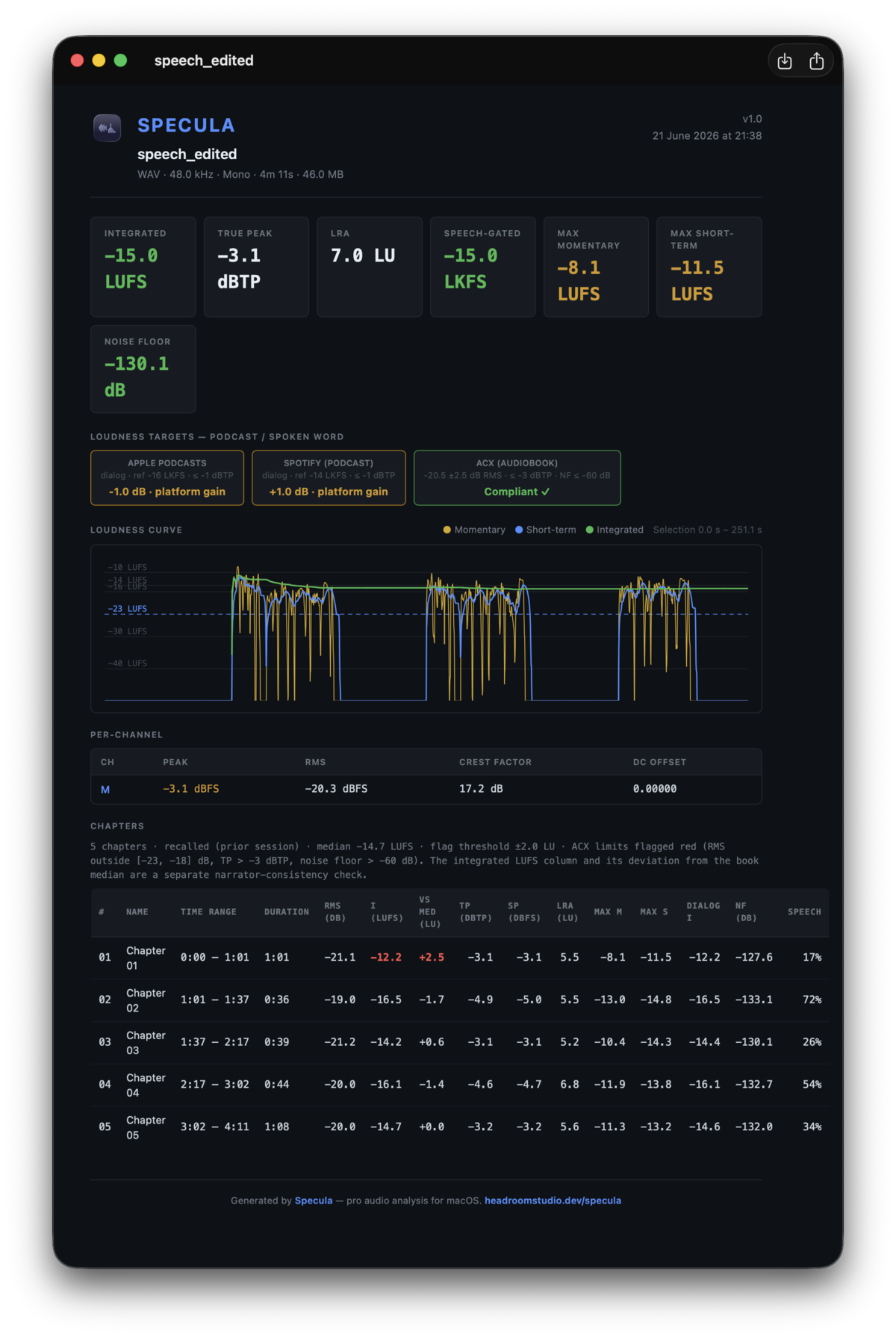
Export the report: ⌥⌘E for PDF, ⇧⌘E for JSON. The per-chapter table carries the same red-cell signalling the app shows, so a narrator or producer reads the exact failing chapters and conditions without opening Specula.

Per chapter, and against the median

A file-level pass isn't enough for a book. An audiobook can sit at a perfect −20 dB RMS overall while one chapter recorded on a different day drifts to −16, or a single quiet pickup dips under the noise-floor line. ACX checks per chapter, so Specula does too: every chapter gets its own ACX verdict on RMS, true peak, and noise floor.

The outlier flag catches consistency problems the absolute gates miss. Each chapter is compared to the book's own median loudness; anything beyond the tolerance (default ±2 LU) is flagged even if it's technically inside the ACX band. That's how you spot the chapter that will sound jarringly louder to a listener mid-book.

The corrected dialogue regions from step 1 feed straight into this: per-chapter speech-gated LUFS and the noise-floor reading all measure the speech and silence you confirmed, not what the raw VAD guessed.

Batch a whole series

Skip the app window when you're checking dozens of files.

The specula CLI runs the same engine the app uses, so a script gets the exact same numbers. Score one chapter to a PDF:

$

specula report ch01.wav --mode podcast --format pdf --out ch01.pdf

Or wire the Get Report App Intent into a Folder Action so every new chapter scores itself on save, and a downstream Shortcut step branches on Integrated LUFS or Speech-Gated LUFS without parsing JSON. Walk the folder, flag the chapters that miss, AirDrop the failures to the narrator. Full command reference in the CLI section of the user guide.

Fix what's flagged, in the same app

Each red cell points at its fix, and the two that bounce the most audiobooks have a fix in Edit mode.

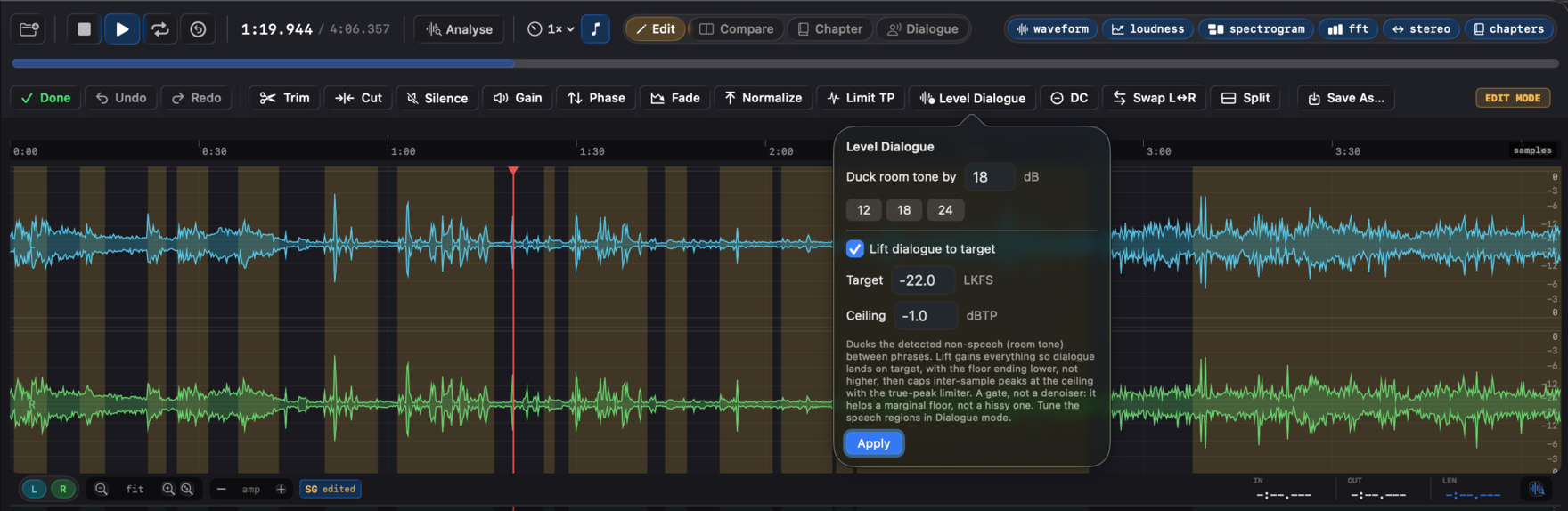
Noise floor over −60 dB RMS is a common ACX rejection, and it's the one a uniform gain can't fix, because raising the voice raises the room tone with it. Level Dialogue (Edit mode) is built for exactly this: it ducks the room tone between phrases using the speech regions you confirmed in step 1, with a fast attack and slow release so word onsets and tails stay clean. Tick Lift dialogue to target and it also brings the voice to your RMS target in the same pass, capping inter-sample peaks at a true-peak ceiling. Because the silence is gated before the makeup gain goes on, the floor ends up lower, not higher, the move a plain Normalize can't make. It's a gate, not a denoiser: it rescues a marginal floor (a quiet room tone just under the gate), not a hissy recording, which still wants a better capture.

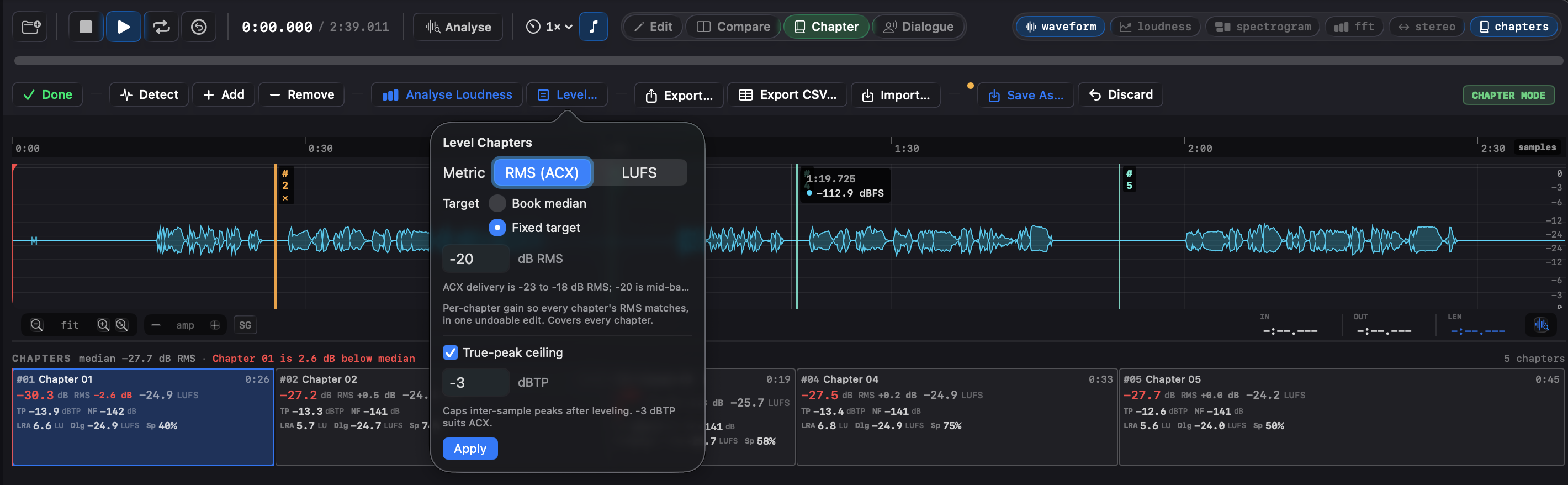
A chapter that drifts off the book's loudness is the consistency flag, and Level chapters (Chapter mode → Level…) is the one-move fix: pick the metric (RMS, the ACX one, by default) and the target (the book's own median, or a fixed value such as −20 dB RMS, mid the ACX −23..−18 band, for consistency and compliance at once), and Specula applies a per-chapter gain and re-measures. A true peak over −3 dBTP is a Limit TP pass that caps the inter-sample peaks without touching loudness. Each is one undoable edit that saves a new file, never the original. See the editing workflow →

See it in Specula

The Level Chapters popover offering an RMS or LUFS metric, a book-median or fixed target, and a true-peak ceiling.
Even out the book. Level every chapter to the book median or a fixed target in one pass.
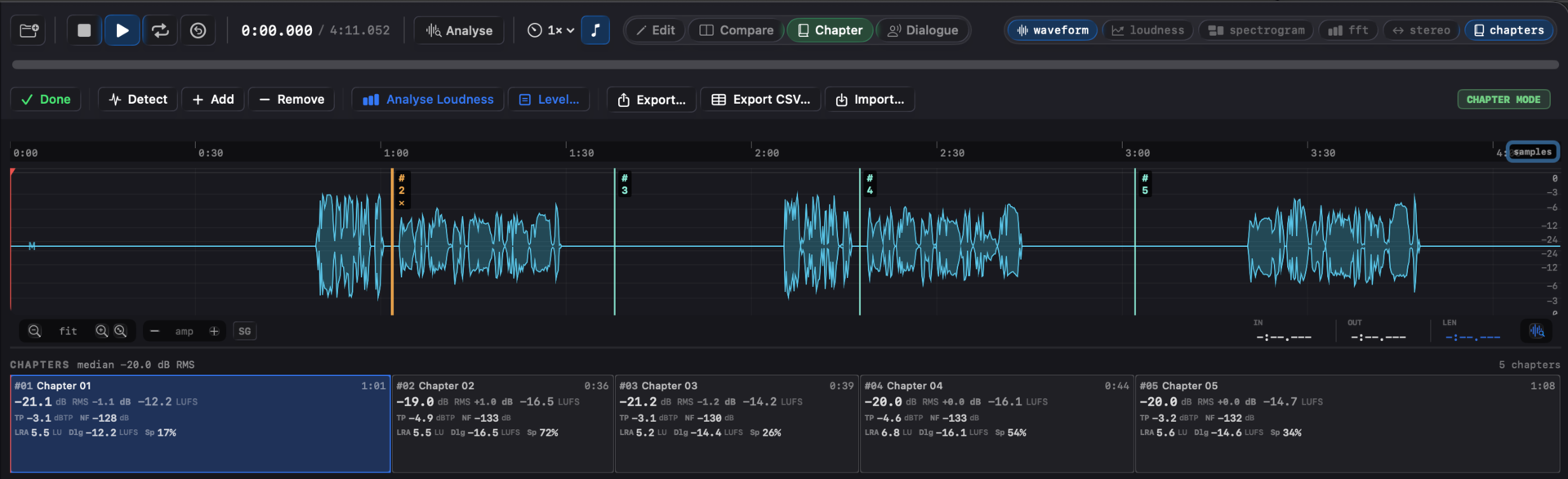
The same audiobook after Level chapters, with the per-chapter values now inside the ACX window.
After leveling. The same book with every chapter pulled inside the ACX window.
The Level Dialogue popover ducking room tone and lifting dialogue to a target.
Fix the noise floor. Room tone is a common ACX rejection; Level Dialogue ducks it before the gain instead of an external denoiser.
A Specula PDF report showing the per-chapter ACX table with failing cells in red.
A per-chapter receipt. The report carries the ACX table with failing cells in red, ready to hand to a publisher.

Ship the audiobook with confidence

Specula is the pass between "the narration is done" and "it's uploaded to ACX." It tells you, per chapter, exactly which files clear the spec and which won't, and gives you the fix for the two flags that bounce the most books: Level Dialogue for a marginal room-tone floor, and Level chapters for a chapter that drifts off the book's loudness. Read the numbers, fix the flags, hand off the receipt.