Lyra 1.5 shipped this week. The headline is short: Lyra is now scriptable from every Mac automation surface I could find. Shortcuts, Spotlight, Focus Filters, Stream Deck, Keyboard Maestro, Raycast, AppleScript via osascript. One change underneath, several different shapes on top.
If you've spent any time with Lyra it's because pressing F12 to turn up the monitor is faster than reaching for the knob. That keyboard binding is still the core of the app, and v1.5 doesn't touch it. What v1.5 adds is everything around the keyboard - four other ways to drive Lyra that fit shapes of automation the F-keys can't.
The keyboard, unchanged
F-keys are first and stay first. F10 mutes, F11 lowers, F12 raises; Shift gets you half-steps and DIM; Option toggles Mono; Ctrl jumps to a reference slot. None of that moved. If you've been running Lyra 1.4 since April and the only thing you've ever done is press F12, v1.5 is invisible. The upgrade adds; it doesn't replace.
Shortcuts.app - eleven App Intents
Open Shortcuts.app and type "Lyra" into the action library. Eleven actions appear, grouped by what they do:
Reads (return structured values, not strings to parse):
Get Lyra State- tapered position, dB, mute / DIM / mono, mixer connection, device name, active slot, volume step.Get Current Monitor Level- tapered + dB.Get Current Reference Level- which slot is active, slot name, calibrated dB SPL (if Audita has paired one).
Monitor toggles (return the new state so you can branch on it):
Toggle MuteToggle DIMToggle Mono
Level setters:
Set Monitor Level- by percent (0-100).Adjust Monitor Level- up or down by one Lyra step, with an optional fine flag for the half-step.
Reference levels:
Switch to Reference Level- by slot 1-3, or by name (case-insensitive, so "Mix" or "K-14" works).Cycle Reference Level- 1 → 2 → 3 → 1.Save Current Level to Reference Slot- by slot 1-3.
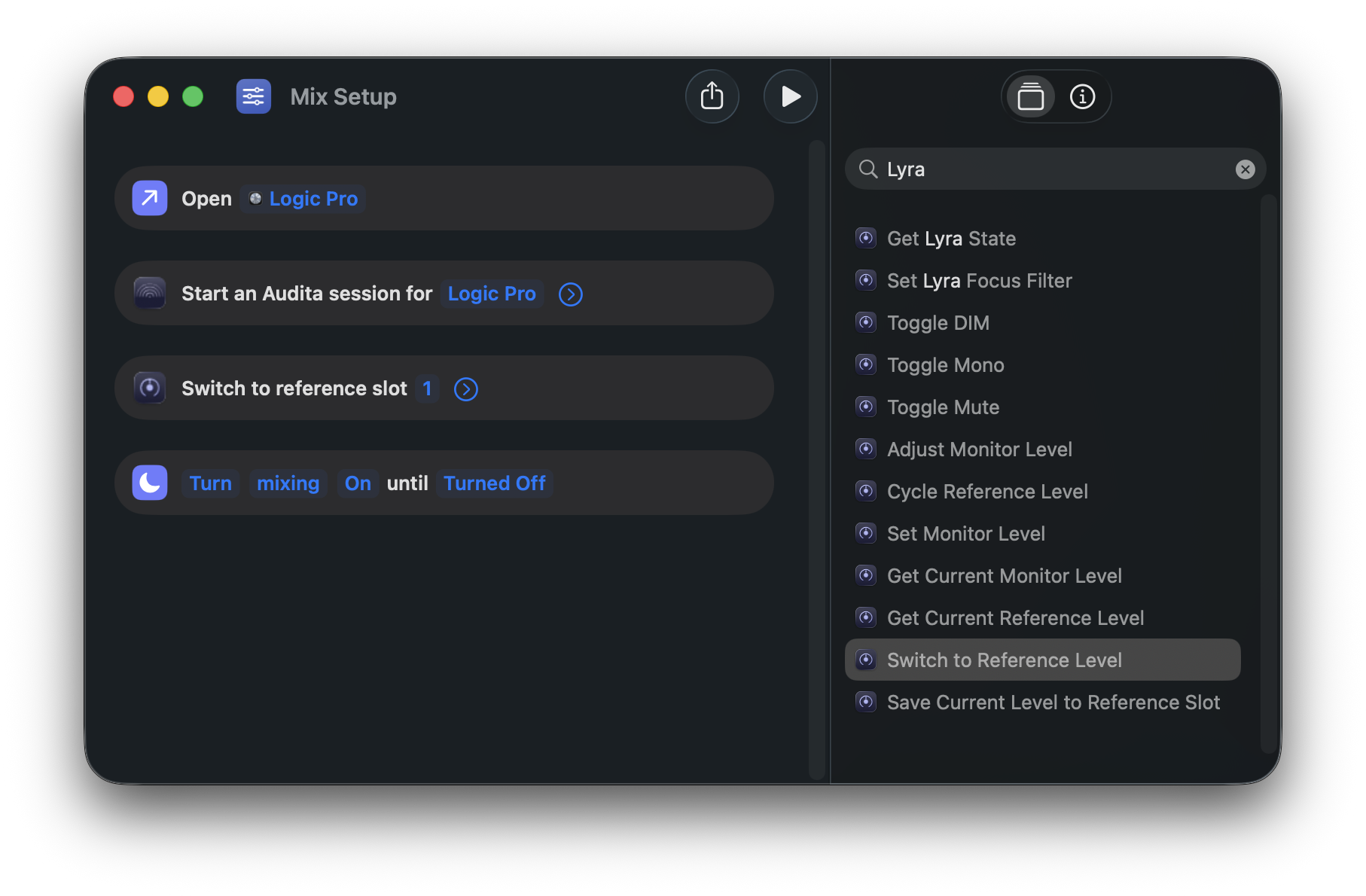
Two design choices are worth knowing about. First, every intent returns structured values. A "Show me the dB" shortcut doesn't have to read a URL and pull a number out; it gets a Lyra State object with a db property, and Shortcuts.app's "Get Property of" action picks the value cleanly. Multi-step workflows - "read the state → branch on muted → post to Slack with the slot name" - chain without text-wrangling.
Second, Switch to Reference Level accepts the slot by name, not just by number. If you've named slot 2 "Mix" in Lyra, your shortcut can say "Switch to Reference Level → Mix" and it'll find it case-insensitively. The numeric path still works for portability across users who use different names.
The point of this surface is composition. The keyboard handles one action at a time; Shortcuts handles sequences. A morning routine that opens Logic, switches to slot 2, sets a 70% monitor level, and silences notifications becomes one shortcut named "Start session." A "post current mix to Slack" reads the live state, formats a line, and fires a webhook - in a dozen seconds of building.
Spotlight - for free
The most-reached-for intents - Toggle Mute, Switch Reference Level, Set Monitor Level, Get Lyra State, and a handful of others - are pre-wired as App Shortcuts. That means they show up in Spotlight without you building anything. Press ⌘Space, start typing "Toggle mute in Lyra", and the action lands in the result list. Press Enter and the monitor flips.
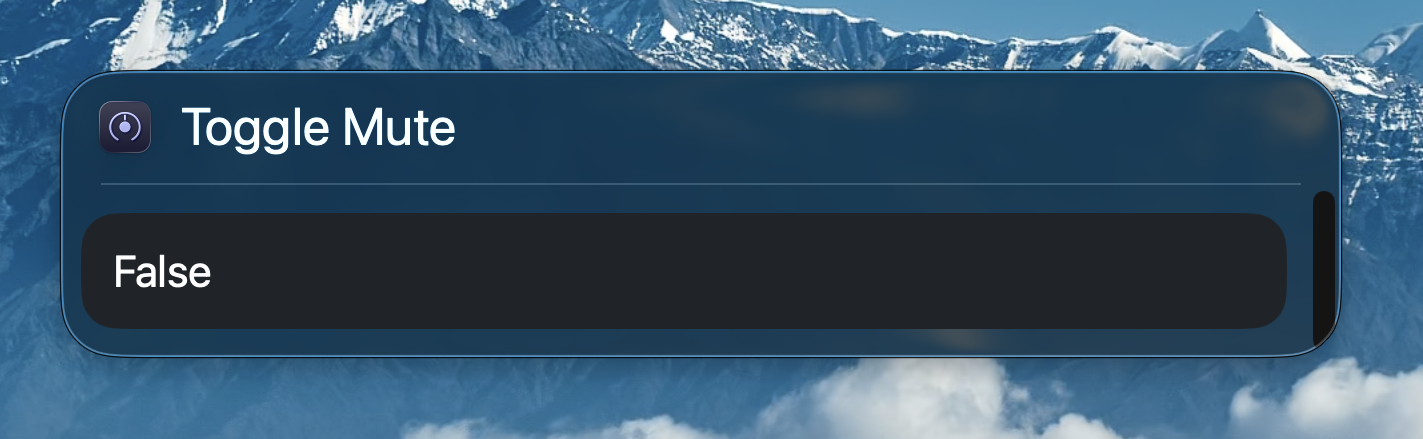
False - we just unmuted). No menu to dig through, no shortcut to build first.Same for the read intents. "Get monitor level from Lyra" returns the current dB value as a Spotlight result you can copy or chain. Useful when you want a number without leaving the keyboard - and you don't want to open Shortcuts.app to see it.
Spotlight is the lowest-friction automation surface macOS has. Just a key combo and a few characters. Lyra now lives in it.
Focus Filters - monitor level tied to mode
System Settings → Focus → pick a mode (or make a new one) → Focus Filters → Add Filter → Lyra → Switch to Reference Level. Pick a slot, save. From now on, when that Focus turns on, Lyra jumps to that reference. Mixing Focus → slot 2 (Mix). Late-night Focus → slot 1 (Quiet). Recording Focus → slot 3 (Loud, for talkback playback).
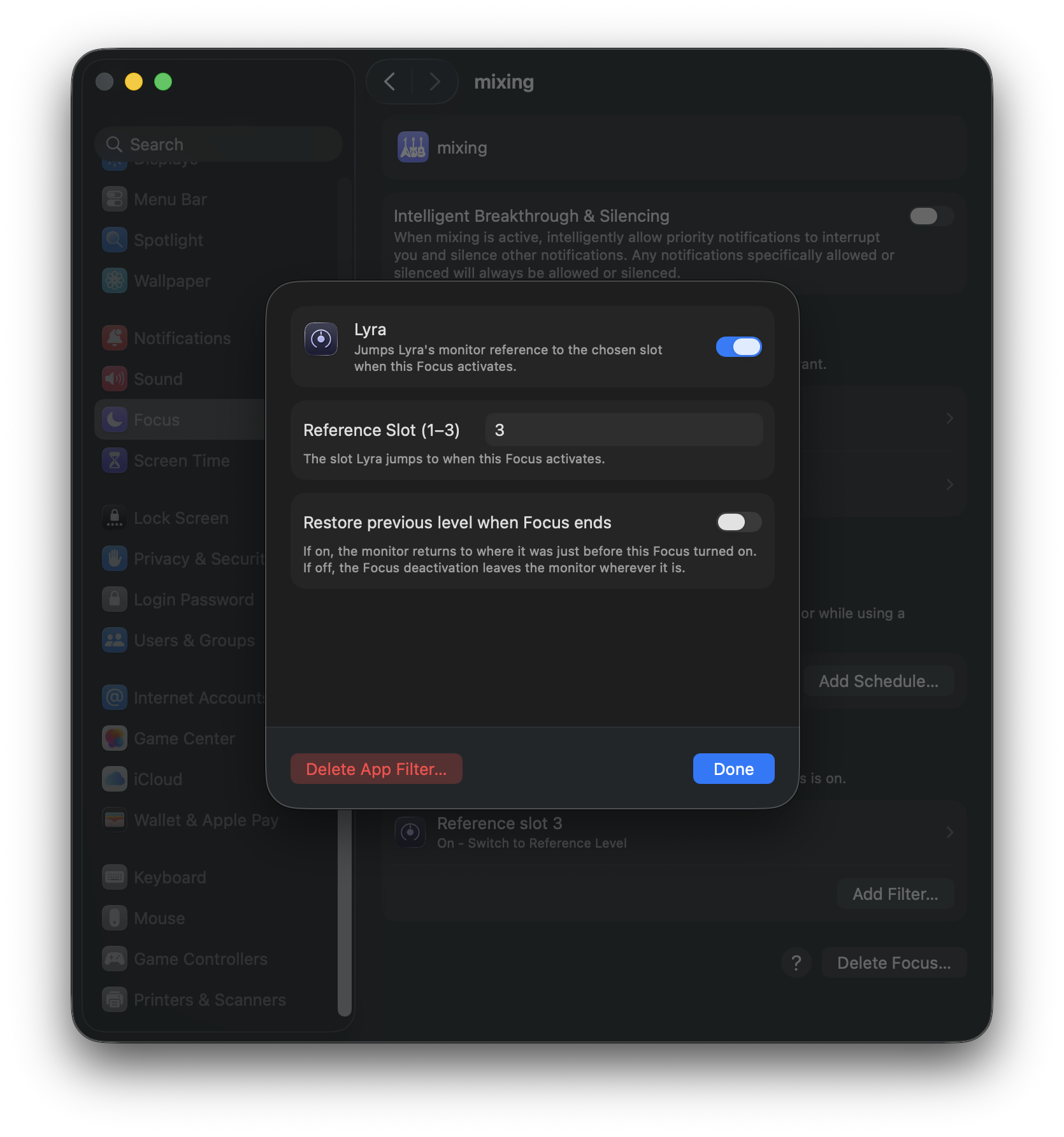
The "Restore previous level when Focus ends" toggle is the small detail that decides what kind of Focus this is. Off (default) means the Focus permanently sets a level - what you want for a "this is the calibrated mixing level" Focus. On means deactivation rolls back to whatever the knob was at the moment the Focus turned on - what you want for a temporary mode like a "quick call" Focus that dims the room and restores when the call ends.
One caveat worth knowing upfront: Lyra must be running for the filter to fire. Apple's Focus Filter framework doesn't launch the host app on Focus events - if Lyra is closed when you enable a Focus, the filter silently does nothing. The fix is just Launch at Login in Lyra's menu. Leave it on and the filter is reliable from then on.
The URL scheme - the fallback for everything else
Not every automation lives in Shortcuts. Stream Deck pushes URLs. Keyboard Maestro pushes URLs. Raycast scripts push URLs. AppleScript can fire URLs via do shell script "open lyra://...". The lyra:// scheme that's been around since 1.4 handles all of them.
What's new in 1.5 is the read endpoints - lyra://volume/get, lyra://reference/current, lyra://state - and x-callback-url chaining on every endpoint. A Shortcuts.app step that needs to know the active slot fires lyra://reference/current?x-success=shortcuts://run-shortcut?name=ContinueChain and the next shortcut receives the slot info as flat query items. No JSON to parse on either side. A Stream Deck button that says "current monitor level" can fire lyra://volume/get?x-success=… and pipe the dB into whatever your launcher displays.
For the write endpoints - volume, toggles, slot jumps - x-callback-url confirms the action completed. ?x-success=… fires after the new state is live, so chained automations don't race ahead before the monitor actually changes. The full endpoint list, return-field schema, and worked examples for Shortcuts, Stream Deck, and Keyboard Maestro live at headroomstudio.dev/lyra/api.
Underneath, a small protocol change
v1.4 subscribed to Apollo's tapered monitor parameter (CRMonitorLevelTapered, 0.0-1.0) - the canonical write target. v1.5 also subscribes to CRMonitorLevel, the dB-scale version (-96.0-0.0). Two subscriptions, two cached values, no extra TCP round-trip per intent or URL call. dB readings now track the hardware knob in real time.
That's the change. Everything above is dispatch into the same handlers - App Intents and URL scheme both speak slot 1-3, percent, tapered position, dB. The redundancy is the point: pick the surface that fits the tool you're already using.
Two scope decisions worth surfacing
Two things to know if you're wiring automations:
Set Monitor Level takes percent, not dB. UA's tapered curve isn't a known linear function of dB. I traced both subscriptions across the full range and the mapping isn't monotonic in the regions you'd actually use it - a dB-set built on top of that would mislead anyone calibrating against an SPL meter. dB-scale set lands alongside a planned lyra://volume/set?db=… URL endpoint when I have a way to do it that doesn't lie to the user.
Save Current Level to Reference Slot clears the slot's stored dB SPL calibration. Same destructive behaviour as the menu's "Save current as…" - the stored SPL was tied to the previous tapered value and no longer applies. If you've calibrated a slot via Audita and aim this intent at it, you lose the dB SPL display until you re-run calibration. Worth knowing before you build a Shortcut that auto-saves the current level somewhere.
One honest aside: Siri voice
If you've been waiting for "Hey Siri, toggle mute in Lyra" to just work, the answer on macOS today is that it doesn't - and that isn't a Lyra bug. Apple's natural-language matcher for App Shortcut phrases (the thing that turns "toggle mute in Lyra" into the Toggle Mute intent) is iOS / Catalyst-only as of macOS 26. Native AppKit apps fall through and Siri says "I don't understand." This affects every native macOS App-Intents app on the current platform, not just Lyra.
The reliable Siri path on macOS today is via a named Shortcut you build in Shortcuts.app. Drop in one or more Lyra actions, name the shortcut something Siri can hear cleanly ("Mute the monitor"), save. Then ask Siri to run it by name. The same trick works for multi-step routines - one Siri phrase fires a shortcut that switches reference, dims, and silences notifications in sequence. It's a workaround until Apple extends Flexible Matching to AppKit, but it does work, and it works today.
The Audita angle
Audita is the studio's SPL meter. If you've calibrated a Lyra slot via Audita ("Send to Lyra…" sheet - measure room SPL at a known monitor level, write the calibration into a slot), the App Intents return that calibrated dB SPL value alongside tapered position and dB. A Shortcut that logs your monitor state every time you switch references gets the room-aware number for free.
The bundle is starting to behave like one product. Lyra recalls levels; Audita teaches Lyra what those levels actually sound like in your room; Shortcuts pulls the room-aware number into wherever you're tracking sessions. None of those layers cared about each other a year ago.
Which surface for what
Each automation surface fits a different shape of work:
- Shortcuts.app - visual, multi-step chains. The daily "start session" routine.
- Spotlight - one-off keyboard-first triggers. ⌘Space and type.
- Focus Filters - mode-based behaviour. macOS itself decides "user is in Mixing mode, do the Mixing thing."
- URL scheme - everything outside Apple's first-party hosts. Stream Deck, Keyboard Maestro, Raycast, AppleScript glue.
You don't have to use all four. Many Lyra users will keep doing what they've always done - F12, F11, Ctrl+F11 - and never open Shortcuts.app. The keyboard is still the fast path for ad-hoc moves and always will be. But if you want to put a "switch to mastering level" button on a Stream Deck, you can. If you want a Focus that automatically silences notifications and drops the monitor to talkback level when a meeting starts, you can.
The keyboard is the keyboard. Everything else is now a choice.
Lyra is a menu-bar app for Universal Audio Apollo interfaces - F-key monitor control, three calibrated reference levels, and now a documented automation surface across Shortcuts, Spotlight, Focus Filters, and the lyra:// URL scheme. v1.5 is a free update for existing customers via Sparkle (Lyra → Check for Updates…); new buyers get a 7-day full-feature trial, $9.99 one-time after that. The full URL reference is at headroomstudio.dev/lyra/api and the in-depth user guide at headroomstudio.dev/lyra/guide.