Audita icon

Headroom

Audita

An SPL meter for your menu bar — built to do two jobs at once. Pin your monitor chain to a calibrated reference and stay there. Track how much hearing the day has cost using NIOSH-aligned dose accumulation. Both run passively while you work.

macOS Target level Hearing health NIOSH
7-day free trial · one-time purchase · macOS 14+ · Release notes Have questions? Read the FAQ →
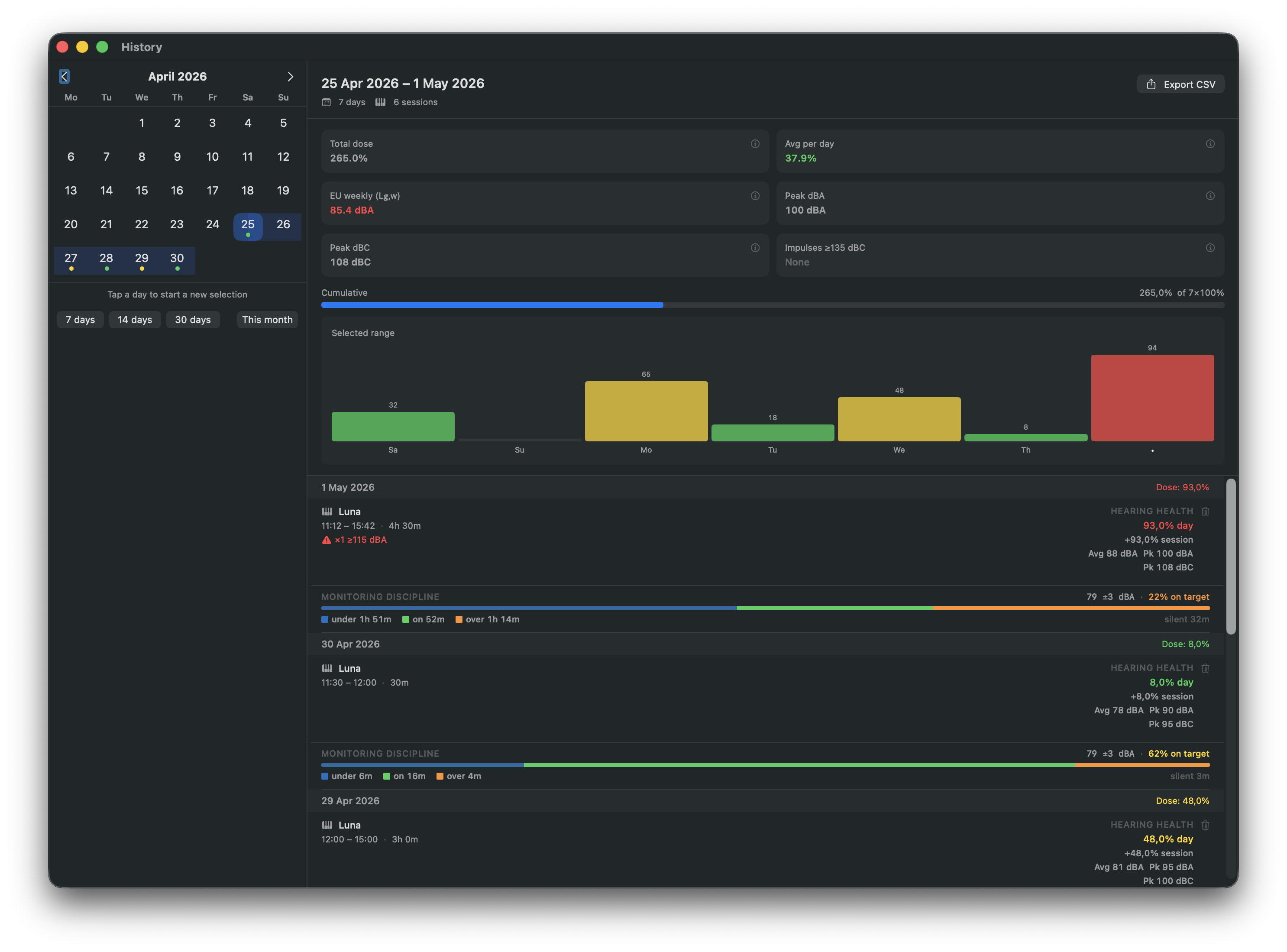
Audita session history window showing past recording sessions with dose and peak levels
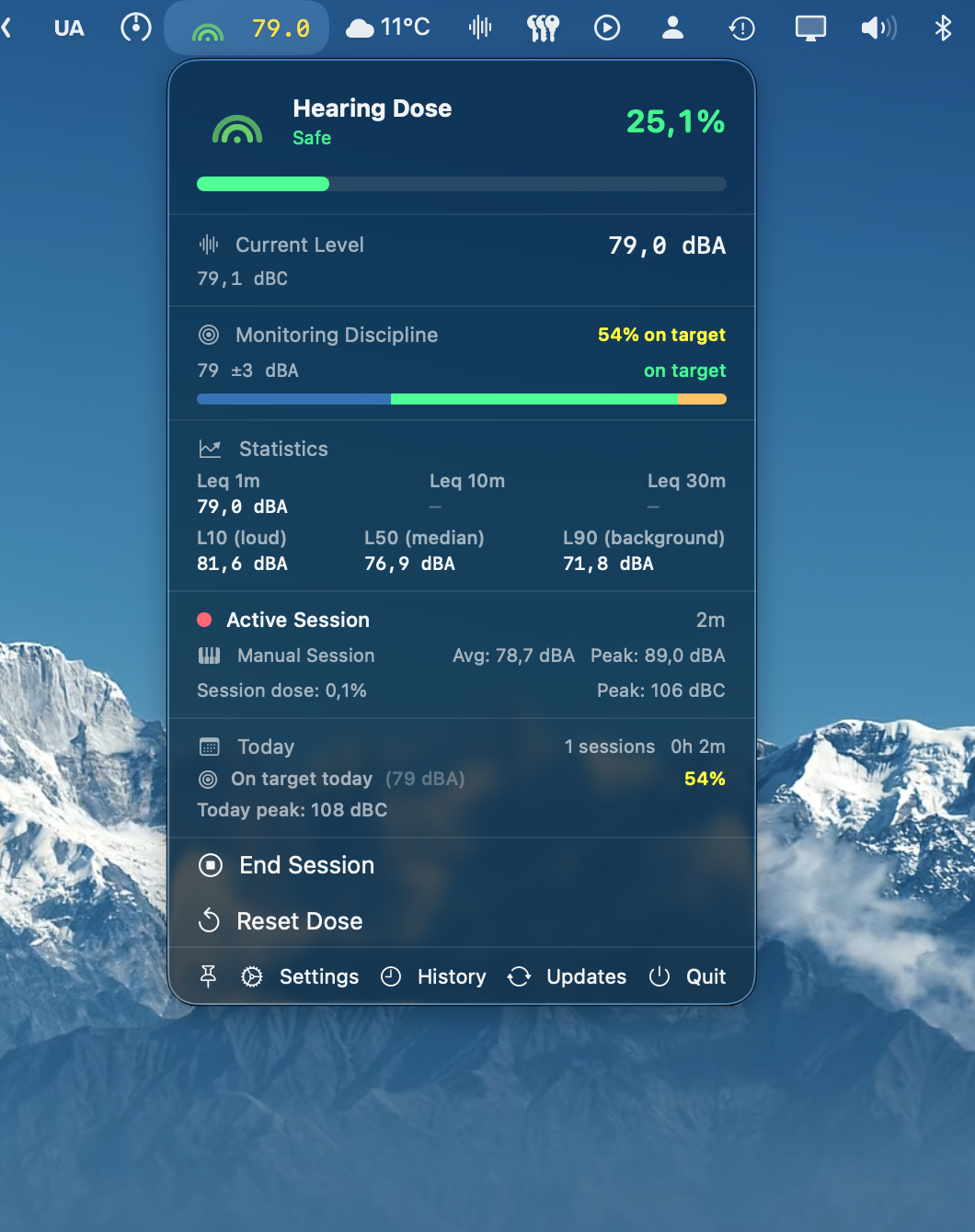
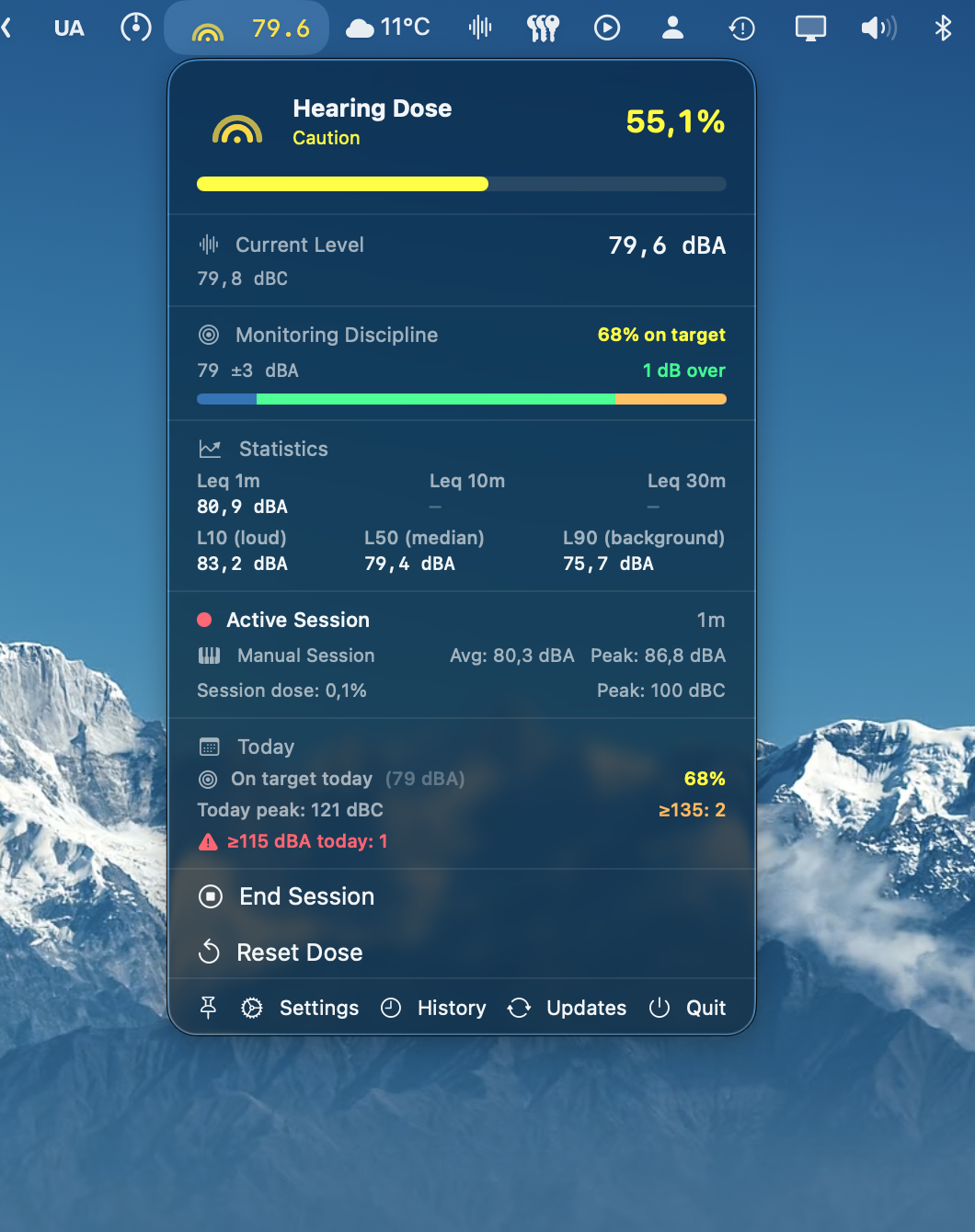
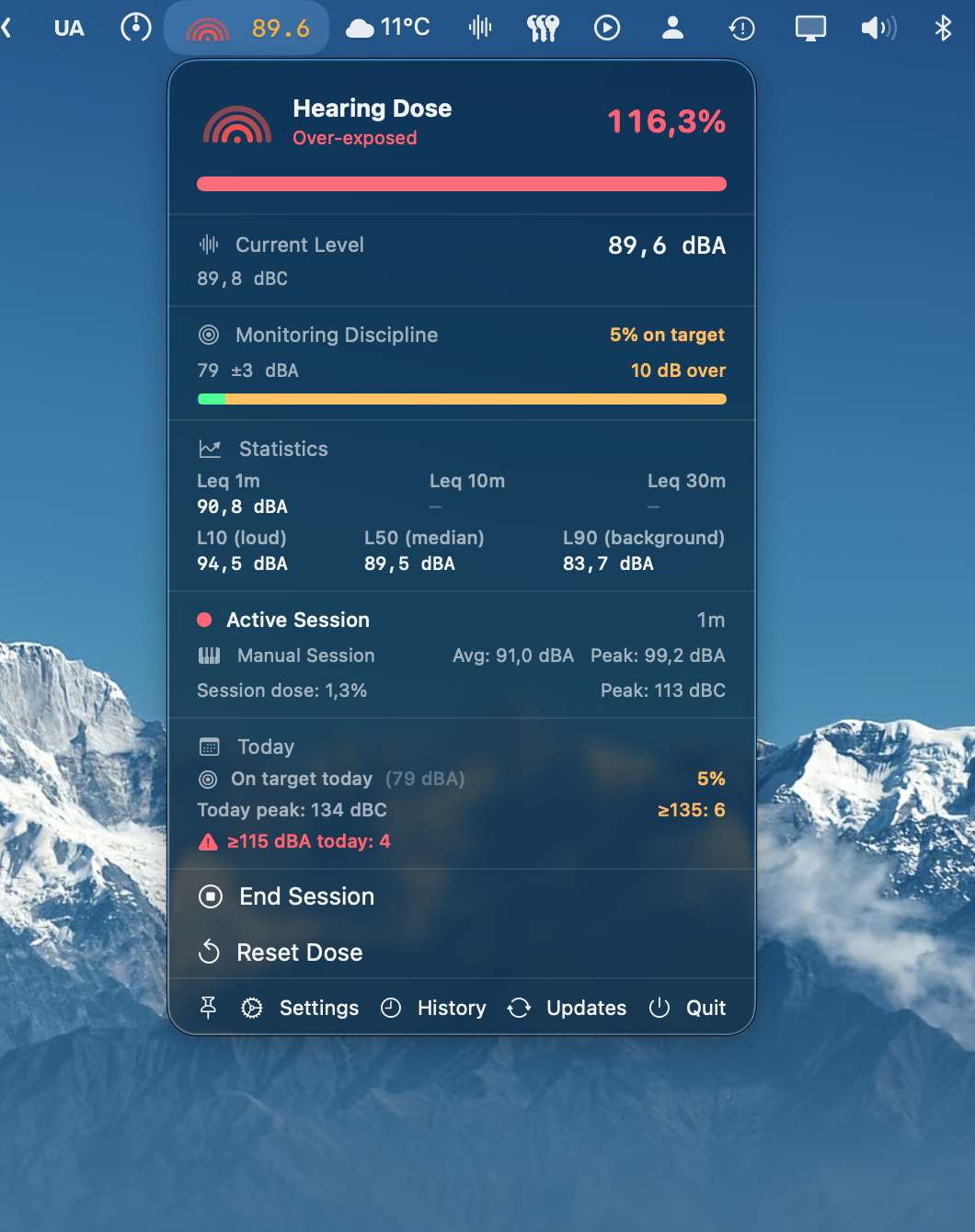
Audita menu bar popover — Safe dose level (green) with monitoring discipline gauge Audita menu bar popover — Caution dose level (yellow) with monitoring discipline gauge Audita menu bar popover — Over-exposed dose level (red) with monitoring discipline gauge
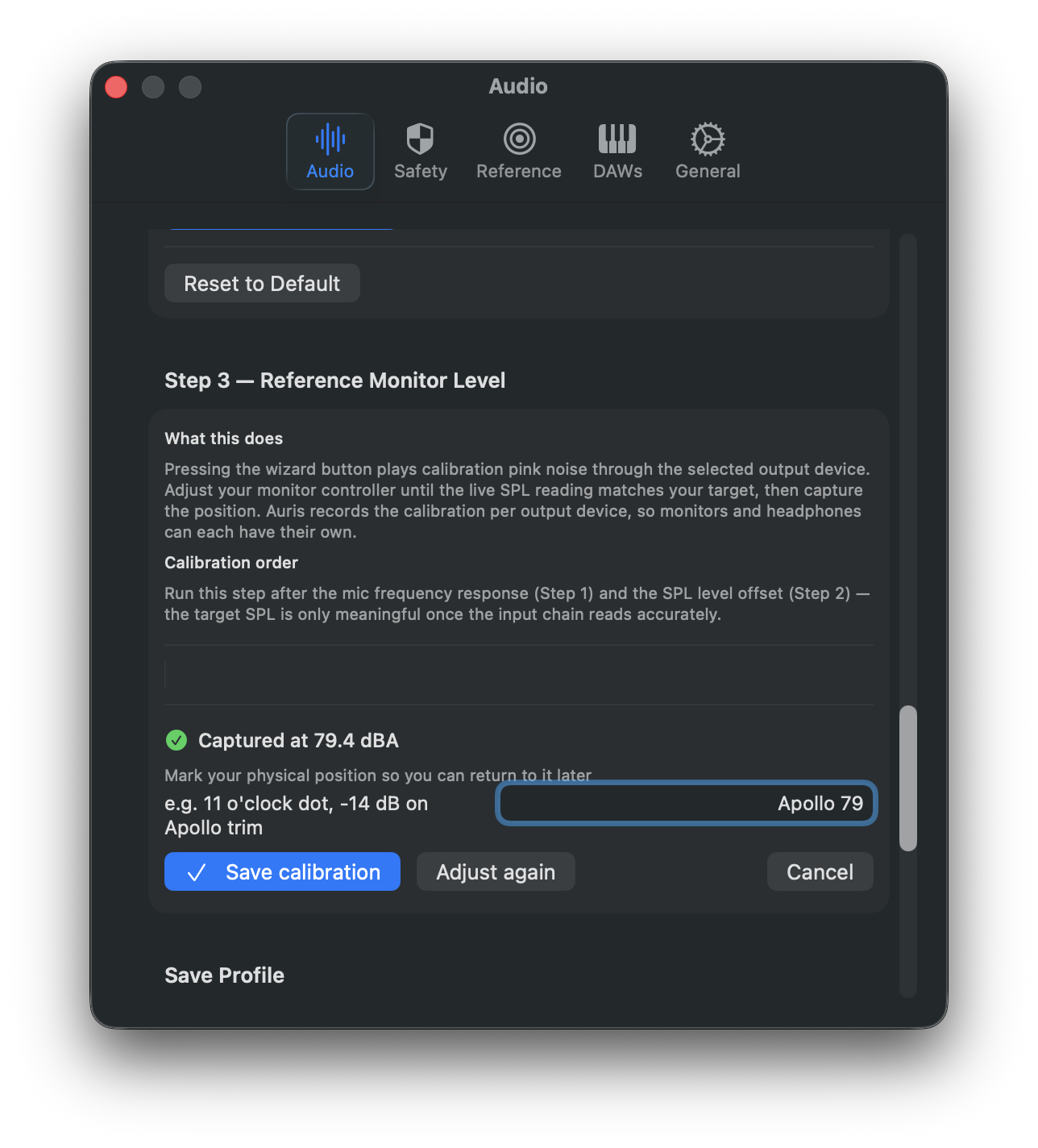
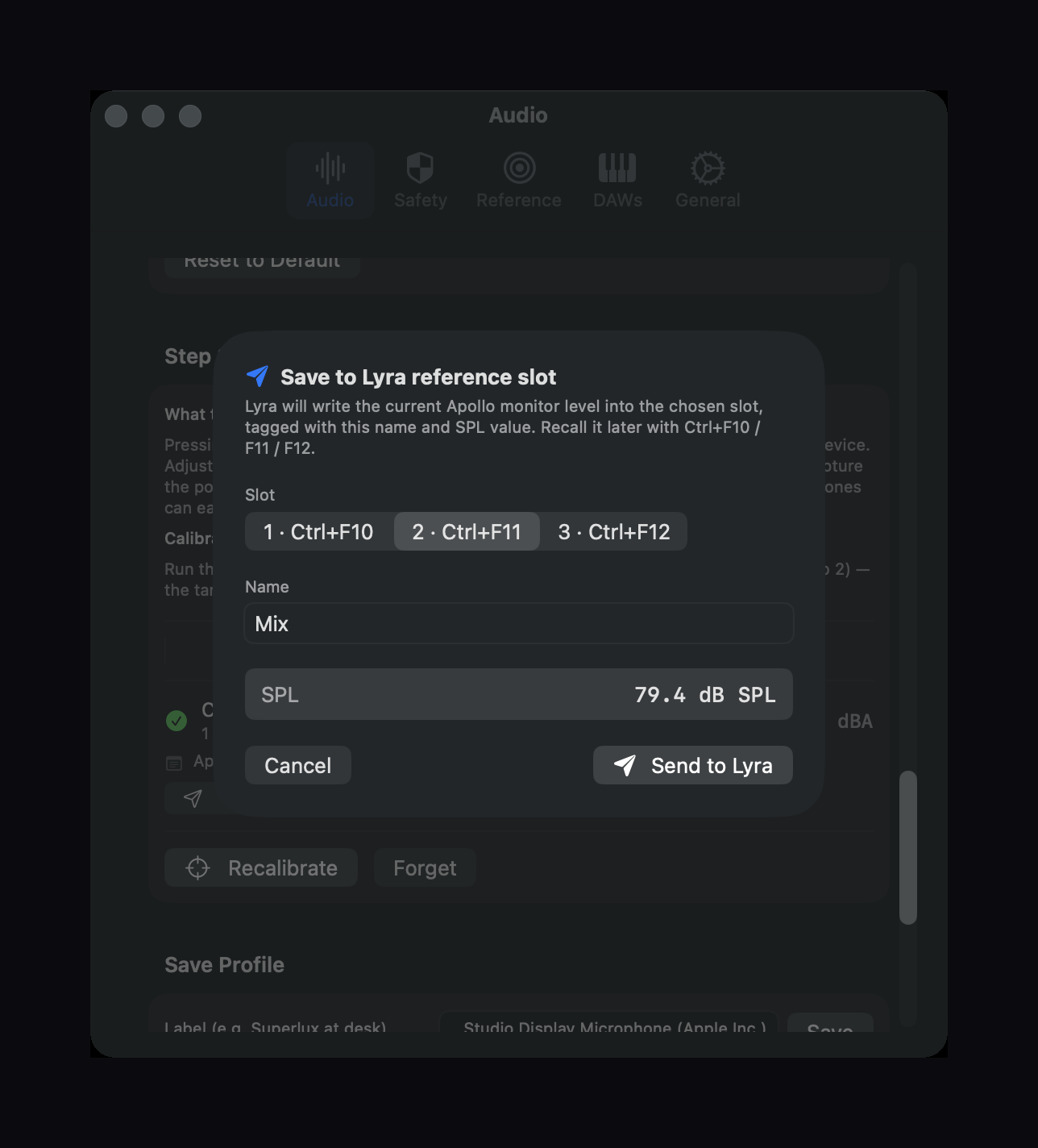
Audita target-level calibration wizard in the captured state — pin the monitor controller to a known dBA reference Audita's Send to Lyra sheet — write a calibration straight into one of Lyra's three reference slots

Where the monitor knob is actually set, and how much hearing the day has cost. Two questions almost no studio answers in numbers.

The monitoring problem. The monitor knob drifts. A decibel up when the playback feels quiet, half a decibel back when a client walks in, a touch up again because the chorus needs energy. None of those moves register as wrong; together they mean the engineer in the afternoon is making decisions at a different level than the one in the morning. The same EQ move feels gentle in one session and aggressive in the next. Mixes that translated cleanly in the room don't translate to the car. None of this is mysterious — it all comes from making relative decisions against a moving reference.

The hearing problem. Studies place noise-induced hearing loss among the top occupational hazards for audio professionals, and not just for live engineers. Long studio sessions at moderate levels accumulate exactly the same way loud ones do, just more quietly. The ear doesn't distinguish between one very loud hour and eight moderately loud ones — the damage arithmetic is the same. There's no pain signal before the threshold shifts. By the time something feels off, the damage is permanent. Most professionals know this abstractly. Almost none have ever actually measured their daily exposure.

One measurement chain, two jobs. Audita answers both questions from the menu bar. The same A-weighted SPL reading that updates the dose counter feeds the calibration tools, the Leq statistics, the target-level wizard, and the Lyra integration. No workflow friction. Two numbers that are usually invisible — your current monitoring SPL and today's accumulated dose — kept honest in the corner of your screen.


Real-time SPL Continuous A-weighted level at 10 Hz, exponentially smoothed for a stable, readable display. The same measurement chain feeds the dose counter, the calibration tools, the Leq statistics, and the Lyra integration — one number, multiple jobs.
Live menu bar readout Show a live SPL number right in the menu bar — dBA, dBC, or alongside the dose icon — for an at-a-glance reading without opening the popover. Optional one-decimal precision and color-coded thresholds (green / yellow / orange / red, defaults from the NIOSH risk gradient at 70 / 80 / 95 dB, fully configurable). Pick the variant that suits how you work in Settings → Menu Bar.
Pinnable measurement panel Detach the measurement display as a floating window that stays above your DAW. Pick which sections to keep — hearing dose, current SPL, monitoring discipline, Leq / Ln, active session, today's summary — in Settings → Panel. The window auto-resizes as you toggle sections, remembers its position, and uses the new Liquid Glass material on macOS Tahoe (26+). Click the menu bar pin again — or double-click the panel — to dismiss.
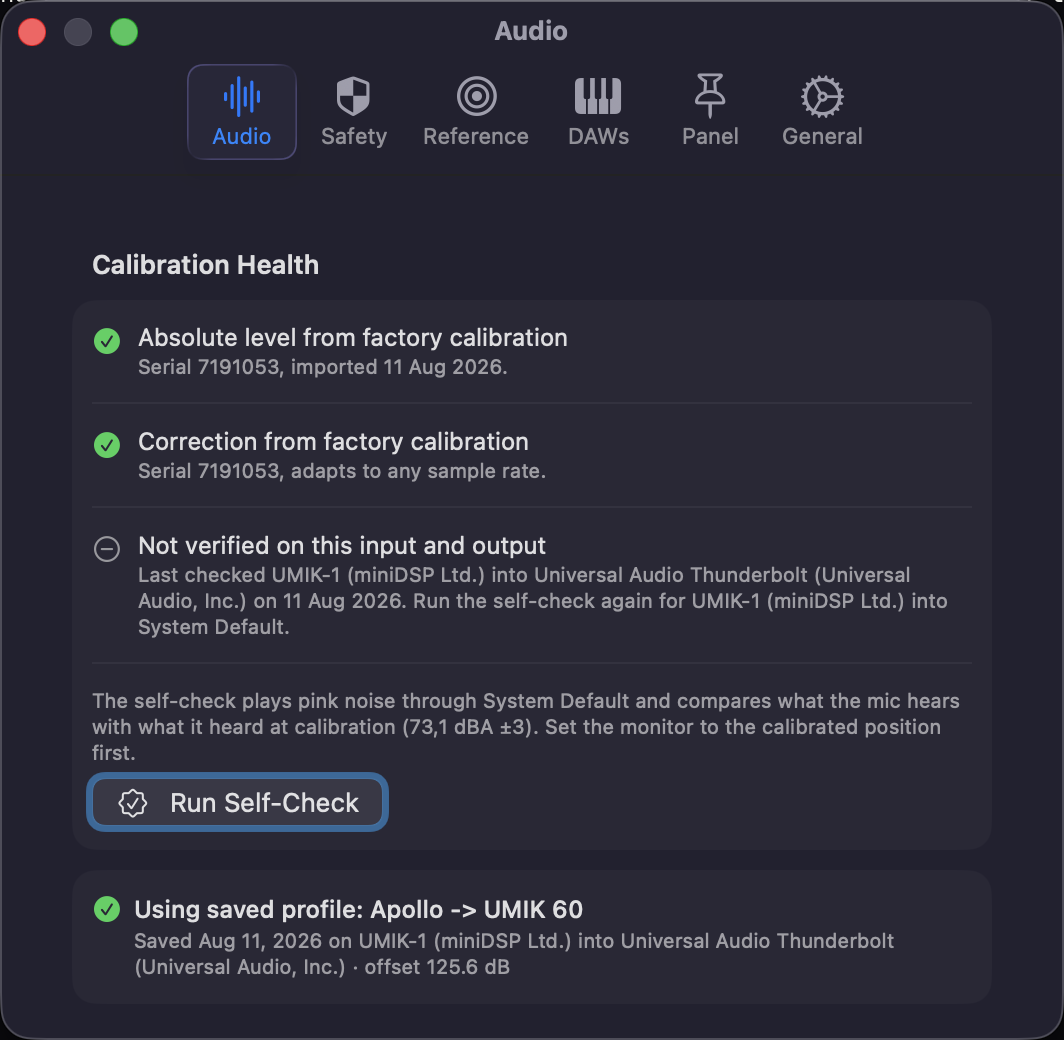
Target-level calibration A pink-noise wizard pins your monitor controller to a specific dBA target (79 dBA approximates Katz's K-System reference; 81 lands close to cinema reference). Captured calibrations record the knob-position note, target value, and measured SPL, with a stale-calibration hint after 90 days. One record per output device, so monitors and headphones are calibrated independently.
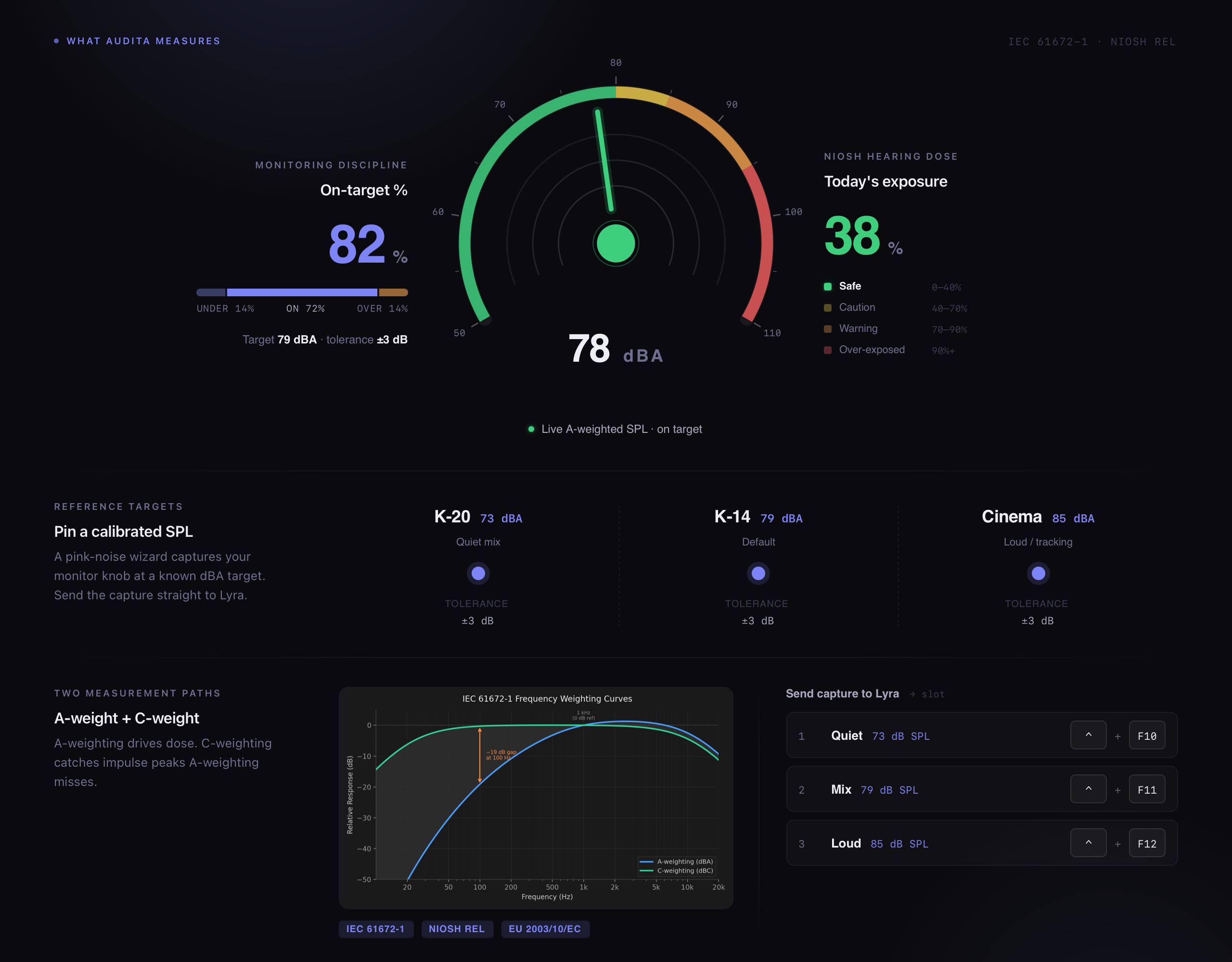
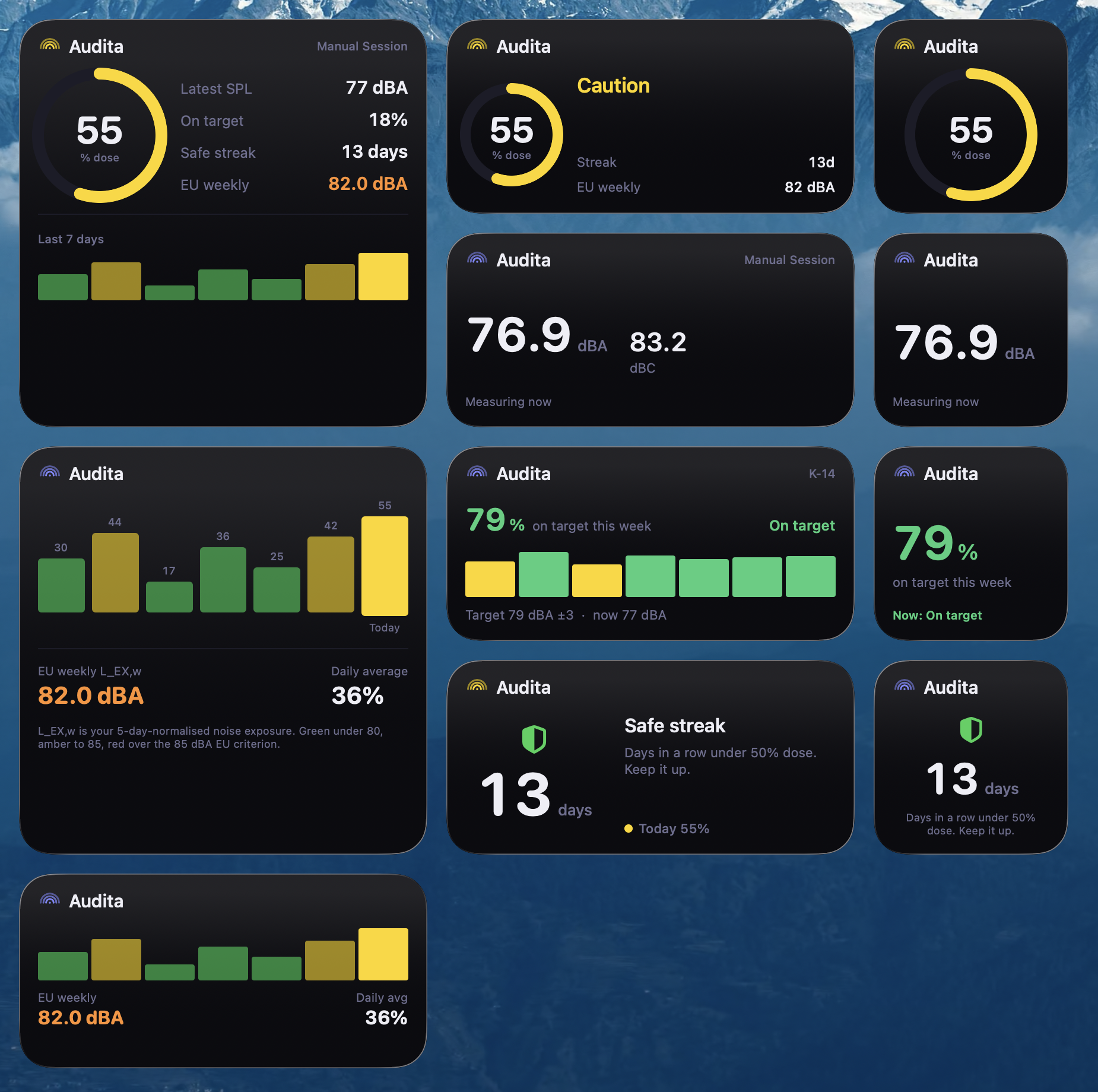
Monitoring Discipline Tracks how consistently you actually monitor at your chosen reference. Pick an industry preset (73 / 79 / 83 / 85 dBA) or set a custom target with a tolerance band, and the menu bar shows a live on-target % chip with a green / yellow / orange ladder, a three-segment under / on / over bar, and a drift hint. Today's Summary aggregates the same metric across sessions; per-session figures land in History alongside the dose stats. Useful at any SPL — fills the gap left by NIOSH dose, which stays at 0 % below 80 dBA.
Monitoring alerts Opt-in notifications when your level drifts (rolling 30-min Leq vs session baseline) or sustains a deviation off target. Each category has its own 30-min snooze, so silencing a drift alert doesn't muffle a dose alert.
Lyra integration After a target-level calibration, hand the position straight to Lyra with a single click. Pick a slot (1, 2, or 3), confirm the name, and your calibrated listening level is one keystroke away from any app — Ctrl+F10 / F11 / F12 in Lyra. The slot remembers the dB SPL value and shows it as e.g. "Mix — 79 dB SPL" in Lyra's menu and HUD.
Hearing dose Accumulates your daily exposure using the NIOSH formula. Four colour-coded states — Safe, Caution, Warning, Over-exposed — update in the menu bar icon in real time. Resets at midnight. Persists across restarts.
Leq & Ln stats Rolling energy-average level (Leq) over 1-, 10-, and 30-minute windows shows how loud you have actually been — not just right now. L10, L50, and L90 percentiles reveal the character of a session: L10 captures your loud peaks, L50 your typical working level, L90 the background noise floor. Useful for both dose context and verifying you're holding a calibrated reference band.
Mic frequency correction Compensates for your measurement microphone's frequency response so the SPL reading reflects the room, not the capsule. A pink-noise sweep measures your mic's deviation from flat and applies the inverse correction before A-weighting. Per-mic profiles can be saved and recalled from Settings.
Peak monitoring C-weighted peak impulse tracking per EU Directive 2003/10/EC. Notifies you when levels cross the 135, 137, or 140 dBC action values. Per-session and daily peak counts recorded.
Session tracking Auto-detects when you open a DAW and starts a session. 15 DAWs supported out of the box — Luna, Logic, Pro Tools, Ableton, REAPER, and more. Manual start and end also available.
Session history Full 30-day history with per-session dose contribution, average and peak SPL, and peak impulse counts. Seven-day bar chart shows your weekly EU L_EX,w exposure level at a glance.
History window Dedicated calendar window for exploring any date range in your 30-day archive. Select a range on the calendar to see cumulative dose, daily average, EU weekly level (L_EX,w), peak dBA, peak dBC, and impulse counts — all in one view. Each stat includes an explanation popover with thresholds and regulatory context.
Instantaneous peaks Tracks A-weighted instantaneous peaks above 115 dBA — the EU Directive 2003/10/EC ceiling for any single moment of exposure. Counts per session, separate from the C-weighted impulse limits.
Conservative mode Optional setting that uses max(dBA, dBC) for dose accumulation. Designed for bass-heavy work — sub-mixing, kick drum tracking, live sound — where A-weighting alone may underreport physical energy. No formal standard; a maximum-protection option you can enable in Settings.
Input channel selection Pick any individual input channel from your audio interface — not just the default stereo pair. Useful for measuring via a talkback mic, a dedicated measurement input, or any other channel on multi-channel interfaces like the Apollo Twin X. Channel names are read directly from the driver.
Non-invasive Lives in the menu bar with no Dock icon. Measures passively via any CoreAudio input device — a built-in mic, a measurement mic, or any interface input channel. Nothing touches your signal chain.
Auto-updates Stays current automatically. You'll be notified in the menu when a new version is available.
Launch at login Optionally start with macOS so dose tracking begins as soon as your session does.
macOS Sonoma 14.0 or later
Hardware Any audio interface or built-in input with a measurement microphone
Permission Microphone access (audio is processed locally, never transmitted)

Audita reads audio from a microphone positioned at your listening position and converts it to A-weighted SPL using a proper IEC 61672-1 filter — the same standard used in professional sound level meters. It samples 10 times per second. That single measurement chain feeds two sets of tools.

Monitoring side. The live SPL feeds a target-level calibration wizard that pins your monitor controller to a chosen dBA target. Pink noise plays through your selected output, the wizard waits for the reading to settle inside a configurable tolerance band, you click Capture, and the position is recorded with a knob-position note. After saving, a one-click handoff to Lyra writes the calibration into one of three reference slots, recallable by Ctrl+F-key. From then on, Monitoring Discipline classifies every 10 Hz tick as under / on-target / over against your tolerance band and surfaces a live on-target % chip plus a daily aggregate — so "did I actually monitor at reference today?" becomes a number, not a vibe. Rolling Leq statistics (over 1, 10, and 30 minutes) plus L10/L50/L90 percentiles describe the character of the session at a finer grain.

Hearing-protection side. The same SPL stream accumulates hearing dose according to the NIOSH Recommended Exposure Limit formula. The key relationship: at 85 dBA you have 8 hours; every 3 dB increase halves that time.

LevelSafe duration
85 dBA8 hoursNIOSH criterion
88 dBA4 hours
91 dBA2 hours
94 dBA1 hour
97 dBA30 minutes
100 dBA15 minutes

A parallel C-weighted path runs simultaneously for peak impulse monitoring. Unlike A-weighting, C-weighting is nearly flat from 31.5 Hz to 8 kHz — it accurately captures the energy of transient events such as drum hits and loud clicks that can cause immediate cochlear damage regardless of cumulative dose. EU Directive 2003/10/EC specifically mandates C-weighted peak measurement for exactly this reason.

IEC 61672-1 A-weighting and C-weighting frequency response curves showing how A-weighting attenuates low frequencies while C-weighting remains nearly flat

IEC 61672-1 A-weighting vs C-weighting — A-weighting de-emphasises bass, where C-weighting stays flat. The gap between the two readings indicates how much low-frequency energy A-weighting is missing.

All data stays on your Mac. No telemetry, no cloud sync, no servers. More answers in the FAQ →

NIOSH REL 85 dBA reference, 3 dB exchange rate, 80 dBA accumulation threshold — the most protective mainstream occupational noise standard.
IEC 61672-1 International standard for sound level meter frequency weighting — A-weighting (4 biquad IIR sections) and C-weighting (2 biquad IIR sections), both normalised at 1 kHz.
EU 2003/10/EC EU Directive on occupational noise. Defines the 135 / 137 / 140 dBC C-weighted peak action levels and the 115 dBA A-weighted instantaneous ceiling.
ISO 9612 Framework for the weekly noise exposure level (L_EX,w) shown in the session history chart, compared against the 85 dBA weekly criterion.