Overview
Two surfaces, same state#
App Intents are the native macOS Shortcuts surface. Drag them into a Shortcut, speak them at Siri, or wire them into a Focus Filter. They get typed parameters, structured return values, and proper error dialogs when something goes wrong. They're the smoothest path for anyone living inside the Shortcuts ecosystem.
The audita:// URL scheme is the lowest-common-denominator surface for everything else. Anything that can fire a URL can drive it: Stream Deck's built-in System » Open action, Keyboard Maestro's Open URL, Hammerspoon's hs.urlevent.openURL, AppleScript's open location, open "audita://..." from the shell. Responses flow back through x-callback-url as flat snake_case query parameters in plain ASCII - no JSON parsing required on the consumer side.
Audita's state is single-sourced: the intents and URLs read and write through the same AppState. Starting a session via Siri, the menu bar, or the URL scheme is the same operation; the URL endpoints don't see a parallel reality.
Trying it from the shell
open "audita://spl?x-success=https://httpbin.org/get"
open "audita://session/start?daw=Logic%20Pro"
open "audita://monitoring/pause?duration=1800"
Unknown URLs return unknown_endpoint via x-error when an error URL is supplied, and are otherwise logged and ignored. The audio engine must be running for SPL and dose reads to populate; when it isn't, the relevant keys are simply absent from the payload (the request still succeeds).
App Intents
The seven intents#
All seven intents are gated on macOS 14 (Sonoma). They live under Audita in the Shortcuts app's action library. Every perform() resolves Audita's app state first and throws appNotReady if Audita is still finishing launch - the intent surfaces the error verbatim rather than returning silent zeros.
Pushing a calibrated SPL into a Lyra reference slot lives in Audita Settings → Calibration → Monitor level → "Send to Lyra…", not in the intent surface. Sharing a session report is handled by the Session Report window's macOS Share menu, not an intent.
Reads
| Intent | Returns |
|---|---|
| Get Current SPL | dba, dbc, peak_dba (one decimal each). Throws "Audita's audio engine isn't running" when no device is selected or mic permission is denied. |
| Get Today's Dose | dose_percent, remaining_percent (clamped at 0), dose_level (one of safe, caution, warning, danger), plus the four peak counters (135 / 137 / 140 dBC, 115 dBA). |
| Get Monitoring Stats | Streak of consecutive days under 50% dose (counted back from yesterday, today excluded because it's still in progress), today's dose, last seven days' average, session count, warning-day count. |
Writes - sessions
| Intent | Parameters & effect |
|---|---|
| Start Mixing Session | daw (optional text). Starts a manual session. Empty or whitespace daw becomes "Manual". Throws "A session is already running" if one is. |
| End Mixing Session | No parameters. Ends the current session and returns its final dose, DAW, duration, and peak SPL. Throws "No session is running" when nothing is active. |
Writes - monitoring
| Intent | Parameters & effect |
|---|---|
| Pause Monitoring | durationMinutes (required integer). Pauses dose accumulation, peak counters, and session updates. Pass 0 for an indefinite pause; pass any positive value for a timed pause that auto-resumes within ~100 ms of expiry. Spotlight prompts for the value when the action is run without one. |
| Resume Monitoring | No parameters. Safe no-op if monitoring isn't paused. |
Focus Filter
Start a Mixing Session#
Audita registers a Focus Filter called Start a Mixing Session. Wire it once and a Focus turning on starts a session automatically; the Focus turning off ends it.
- Open System Settings → Focus → (pick a Focus) → Add Filter → Audita → Start a Mixing Session.
- Optional: set a DAW label. It's recorded in the session as
daw. - Turn the Focus on. Audita starts a session.
- Turn the Focus off. Audita ends the session.
Carry-over rule
If a session was already running when the Focus activated, Audita leaves it alone - the filter only ends what it started. If you manually ended the session before the Focus turned off, the disable does nothing (no double-end). The carry-over state is in-memory only, so quitting Audita while the Focus is on loses it. Documented constraint.
Spotlight & Siri
Pinned phrases#
These phrases are baked into Audita's AppShortcutsProvider. They show up in Spotlight as you type and are recognised by Siri verbatim. ASCII only - if a phrase silently changes, it disappears from Spotlight.
| Intent | Phrases |
|---|---|
| Get Current SPL | "What's the SPL in Audita", "Get the SPL from Audita" |
| Get Today's Dose | "What's my dose in Audita", "Get today's dose from Audita" |
| Get Monitoring Stats | "Get my monitoring stats in Audita", "Show my streak in Audita" |
| Start Mixing Session | "Start a mixing session in Audita", "Start session in Audita" |
| End Mixing Session | "End my mixing session in Audita", "End session in Audita" |
| Pause Monitoring | "Pause Audita", "Pause monitoring in Audita" |
| Resume Monitoring | "Resume Audita", "Resume monitoring in Audita" |
Errors
Intent error vocabulary#
Intent errors surface in Shortcuts as plain-English dialogs and in Siri as spoken responses. They're pinned strings - the wording is stable across releases so a Shortcut that branches on the message text doesn't break. They share the snake_case error_code map the URL scheme uses, so an automation that mixes intents and URL calls sees one consistent vocabulary.
| Message | When it fires |
|---|---|
| "Audita hasn't finished launching yet" | Intent ran before AppState was fully wired. Cold-launch race; rare in practice because the bridge is registered at the end of init. |
| "Audita's audio engine isn't running" | No input device is selected, the device is unavailable, or microphone permission was denied. Reads of SPL fail; dose reads still work because dose is persisted. |
| "A session is already running" | Start Mixing Session called when one is active. |
| "No session is running" | End Mixing Session called when nothing is active. |
URL scheme
audita:// endpoints#
Four read endpoints, four write endpoints. Reads need an x-success callback to deliver their payload - without one, the request is silently dropped because there's no other return channel. Writes treat both callbacks as optional. Responses use flat snake_case query parameters in plain ASCII so they survive a round-trip through Shortcuts' "Get URL" step without percent-escape noise.
Read endpoints
Live SPL snapshot. Updates at 10 Hz behind the scenes; this returns whatever the audio engine published most recently.
Today's NIOSH dose plus the four peak counters. Dose is persisted to disk on every measurement; this read works even if the audio engine is currently stopped.
The currently-running session, if any. The "no session" case returns the same shape with an empty value rather than absent keys, so callers branch on active instead of checking key presence.
Aggregated read - every key from the three reads above, plus the monitoring pause state. Use this when you want one round-trip to populate a Shortcut, Stream Deck overlay, or status dashboard.
Write endpoints
Start a manual session. The daw parameter records a label; empty or whitespace becomes "Manual". Returns the new session payload (same shape as audita://session).
End the current session. Returns the ended session payload so you can pipe the final dose, duration, and peaks somewhere.
Pause dose accumulation, peak counters, and session updates. duration is in seconds (the App Intent uses minutes; the URL uses seconds). Omit it for an indefinite pause. The SPL feed checks the pause state every tick at 10 Hz, so dose stops accumulating within ~100 ms.
Resume monitoring. Safe no-op if monitoring isn't paused.
Chaining
x-callback-url#
Two optional query parameters on every endpoint:
| Param | Fires when |
|---|---|
x-success |
The endpoint completed successfully. Audita appends its return values as query items, plus result=ok (unless the caller already set result on the URL), then opens the result URL. |
x-error |
The endpoint failed. Audita appends error_code (snake_case ASCII) and error_message (plain ASCII), then opens the result URL. Branch on error_code - the message text may be reworded between releases. |
Query items on the callback URL are appended in alphabetical order for deterministic logs and tests. Existing query items on your callback URL are preserved unchanged.
Example: write chain
Start a Logic Pro session and trigger a Stream Deck profile. Audita appends the new session payload to your success URL:
# What you fire:
audita://session/start?daw=Logic%20Pro&x-success=streamdeck://profile/mixing

# What Stream Deck receives (after the start completes):
streamdeck://profile/mixing?active=true&daw=Logic%20Pro&result=ok&start_iso8601=2026-05-16T14%3A02%3A11%2B02%3A00
Example: read chain
Read the full state dictionary into a Shortcut. The Shortcut receives every key as a URL query item - use Get value from URL for each one you care about.
audita://state?x-success=shortcuts://run-shortcut?name=PostExposure
URL-encoding the callback
Your x-success / x-error URLs are themselves embedded as query values inside the audita:// URL. If your callback contains its own =, &, or spaces, percent-encode the whole callback URL before pasting it in - otherwise the outer URL parser will split your callback at the first & and you'll lose everything past it.
# Wrong - the outer parser sees three top-level params on the audita:// URL:
audita://state?x-success=shortcuts://run-shortcut?name=Post&arg=foo

# Right - the callback URL is encoded as a single query value:
audita://state?x-success=shortcuts%3A%2F%2Frun-shortcut%3Fname%3DPost%26arg%3Dfoo
Shortcuts, Raycast, and Keyboard Maestro all expose this as "URL-encode" or "Percent encode" - apply it once when building the outer URL.
Errors
URL error codes#
When an endpoint fails and an x-error URL was supplied, Audita opens it with error_code and error_message appended. Codes are stable snake_case strings; branch on these, not on the message text.
| Code | Meaning |
|---|---|
invalid_argument |
A query parameter is missing or malformed - duration not a positive number, for example. The error message names the offending parameter. |
monitoring_unavailable |
The audio engine isn't running, or Audita is shutting down. Reads return absent keys rather than this error; writes that depend on the engine surface it. |
session_not_active |
session/end called when no session is running. |
session_already_active |
session/start called when a session is already running. |
unknown_endpoint |
The URL host or subcommand isn't recognised. Without an x-error URL, unknown endpoints are logged and ignored silently. |
Plain ASCII only. No en-dashes, em-dashes, or ellipses - so the message survives a round-trip through Shortcuts' "Get URL" step without %E2%80%93 escapes.
Cross-app
Studio-on ritual: a worked example#
The daily-driver cross-app flow: one Shortcut, a handful of steps, both apps coordinate. Open your DAW, start an Audita session, switch Lyra to your reference monitor level, optionally engage a Focus mode so notifications quiet down. Run it from a Stream Deck button, a hotkey, or "Hey Siri, start mixing".
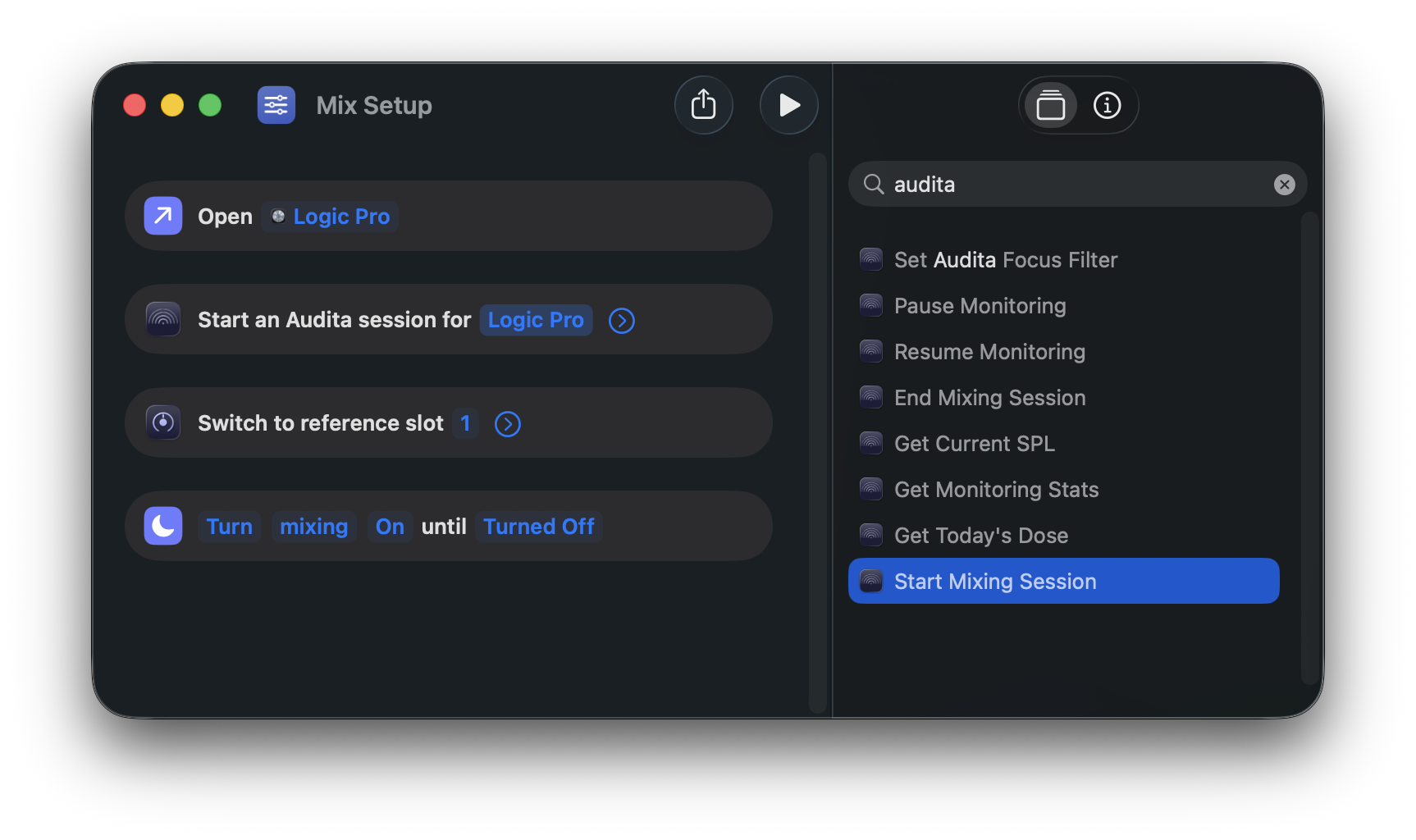
The Shortcut, step by step
Shortcut: "Mix Setup"

1. Open App: Logic Pro                  (built-in Shortcuts action)

2. Start Mixing Session in Audita      (Audita intent)
   DAW: Logic Pro

3. Switch to Reference Level in Lyra   (Lyra intent)
   Slot: 1

4. Turn Focus On: Mixing               (built-in Shortcuts action)
   Until: Turned Off
One tap and the DAW is open, dose tracking is on, the Apollo or Volt monitor level is at your reference, and Mixing Focus is engaged. If you already use Audita's auto-start-on-DAW-launch, step 2 is redundant (auto-detection handles it) and the ritual collapses to three steps. The Focus step in (4) is optional; drop it if you don't use Focus modes.
The same flow via URL scheme
If you're driving the chain from Stream Deck or Keyboard Maestro instead of Shortcuts, the equivalent URL sequence:
# 1. Open the DAW (any "open this app" mechanism works -
#    Stream Deck's System » Open, Keyboard Maestro's Activate Specific App,
#    `open -a "Logic Pro"` from a shell).

# 2. Start the session.
open "audita://session/start?daw=Logic%20Pro"

# 3. Recall the reference slot on Lyra.
open "lyra://reference/2"
Requires Lyra 1.4 or later (URL scheme handler) and Audita 1.2 (App Intents and URL scheme).
When Lyra isn't installed, the in-app "Send to Lyra..." button is hidden and a subtle hint links to the Lyra product page. Audita works fully without Lyra.
The full user-facing reference for Audita - menu bar UI, calibration wizard, Monitoring Discipline, dose math, troubleshooting, licensing - is the User Guide. This page is the canonical reference for the automation surfaces only.