Specula app icon

Workflow · Surround & downmix

Check the surround master and its fold-downs.

A 5.1 or 7.1 master can ship with a swapped channel or a broken stereo fold-down, and the problem doesn't surface until delivery. Specula routes each source channel to one or more outputs in an N→M matrix with per-route gain and polarity, applies a mixdown preset (Lo/Ro, Lt/Rt Pro Logic II, 5.1, mono), and measures either the raw file (PRE) or the result of the routing (POST). Audition and measure the downmix live, then render it to a new file once it's right. The loaded file is never touched.

macOS 5.1 / 7.1 BS.775 downmix Pro Logic II PRE / POST measure Render to file

7-day trial · one-time purchase · macOS 14+

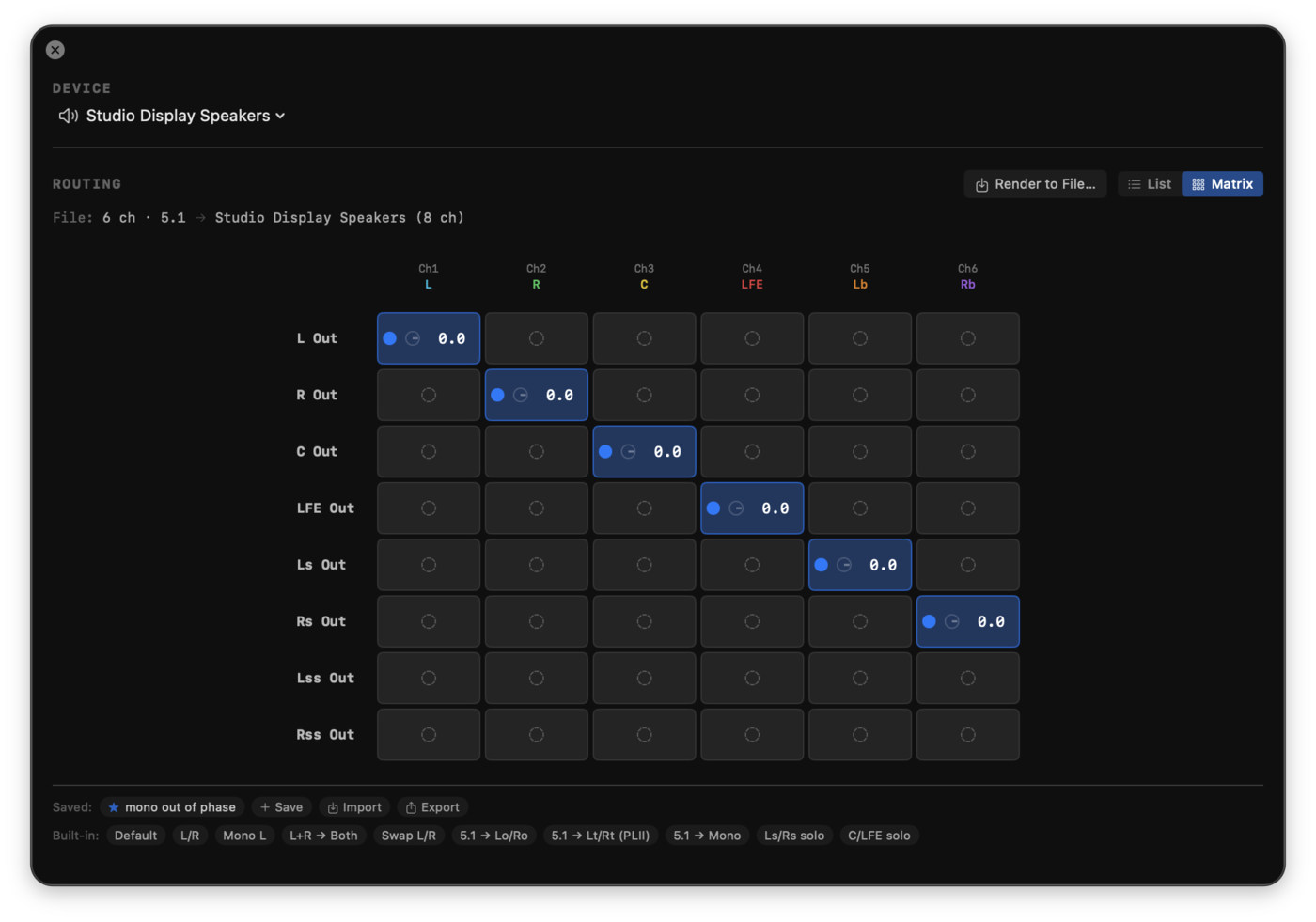
Specula's output routing matrix: a patch-bay mapping 5.1 source channels to output channels with per-cell gain.
Route any channel anywhere. The matrix maps each source channel to outputs with per-cell gain, for monitoring or downmix.

Where surround masters break

A wrong channel order or a broken fold-down is silent until someone plays it back the way the listener will.

A 5.1 master with the wrong channel order is a routing problem, not an EQ problem. L/R/C/LFE/Ls/Rs sit in the wrong slots and the file passes every loudness check while pointing the centre at a surround speaker. The stereo fold-down is the other trap: most listeners hear the Lo/Ro or Lt/Rt version, not the full surround mix, and a fold-down that collapses or phases out doesn't show up on the multichannel meter.

Specula lets you reroute channels for playback and apply the standard fold-down coefficients without modifying the file, so you verify ordering against your monitor system and measure the resulting stereo pair before delivery, not after a reviewer flags it.

OrderReroute any source channel to any output to confirm L/R/C/LFE/Ls/Rs land where your speakers expect them.
FoldApply a Lo/Ro or Lt/Rt downmix preset and hear the stereo version the majority of listeners will get.
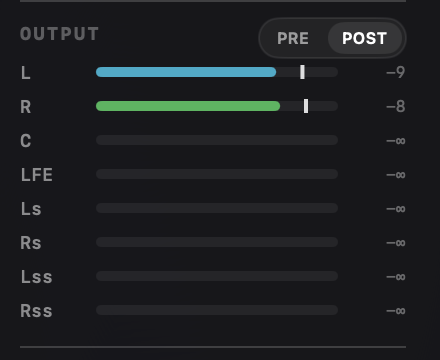
MeasurePRE reads the file on disk; POST reads what reaches the speakers after routing and gain, the downmixed loudness.

The workflow

Open the matrix, route or apply a preset, then choose which signal you measure.

1 · Open the Output window
Click the Output pill in the transport bar, press ⌥⌘O, or pick Window → Output Panel. The window holds the device selector (with the channel count next to each name) above the routing matrix, so the channels the matrix targets and the device driving them stay co-located. It's hidden by default and remembers its size and position; routing settings persist for the loaded file.
2 · Route N→M in the matrix
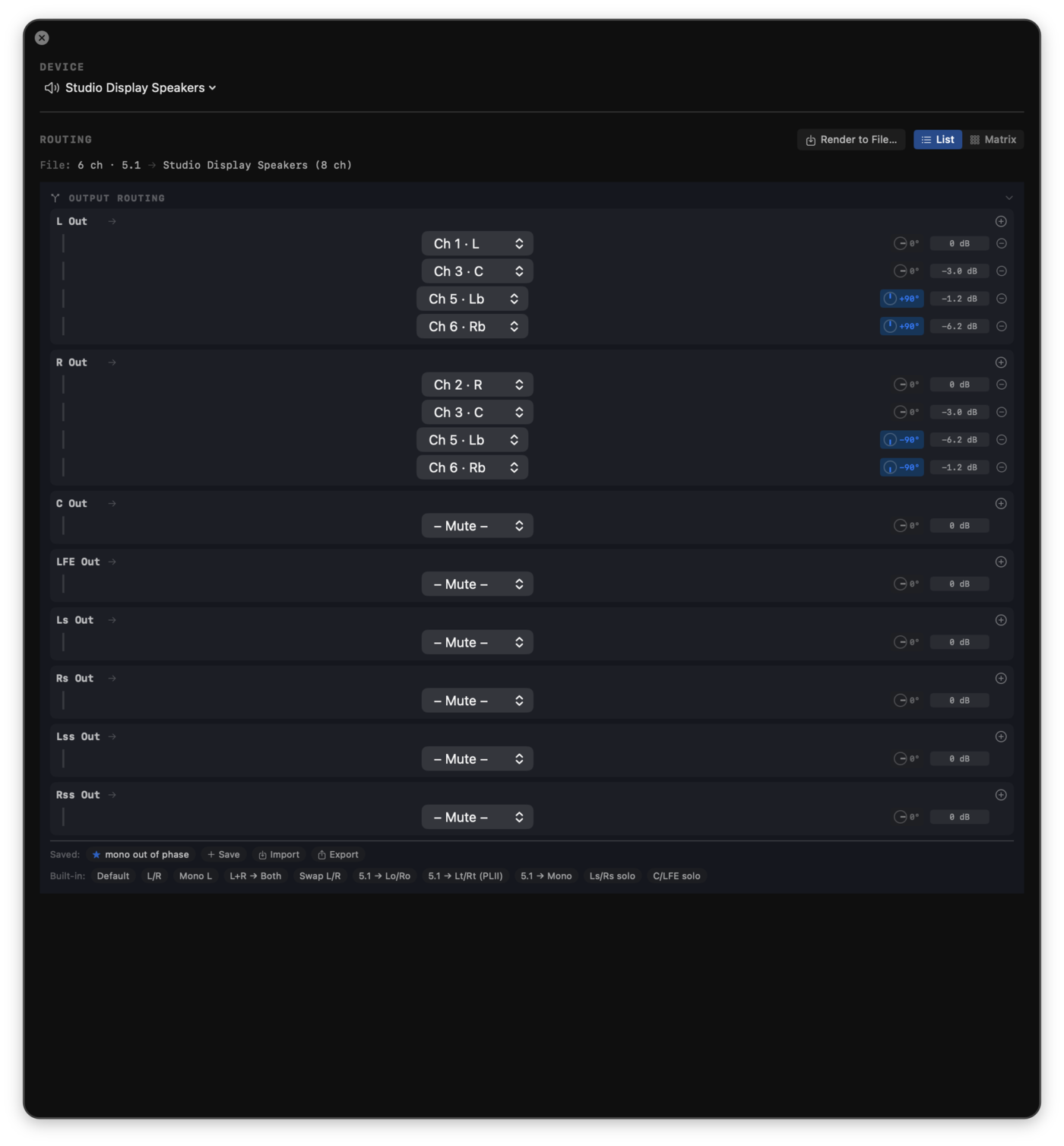
The matrix maps each source channel to one or more outputs with per-route gain trim. In Matrix view (default) each routed cell splits into three zones: an on/off dot, a ϕ glyph that flips polarity (turns orange when active), and a typeable dB gain, drag a value vertically to adjust ±0.25 dB per pixel, click an unrouted cell to enable it at unity. List view gives one row per output with a source picker and a precise dB field. A silent row or unused source column jumps out at a glance. Your view preference persists across launches.
3 · Apply a mixdown preset
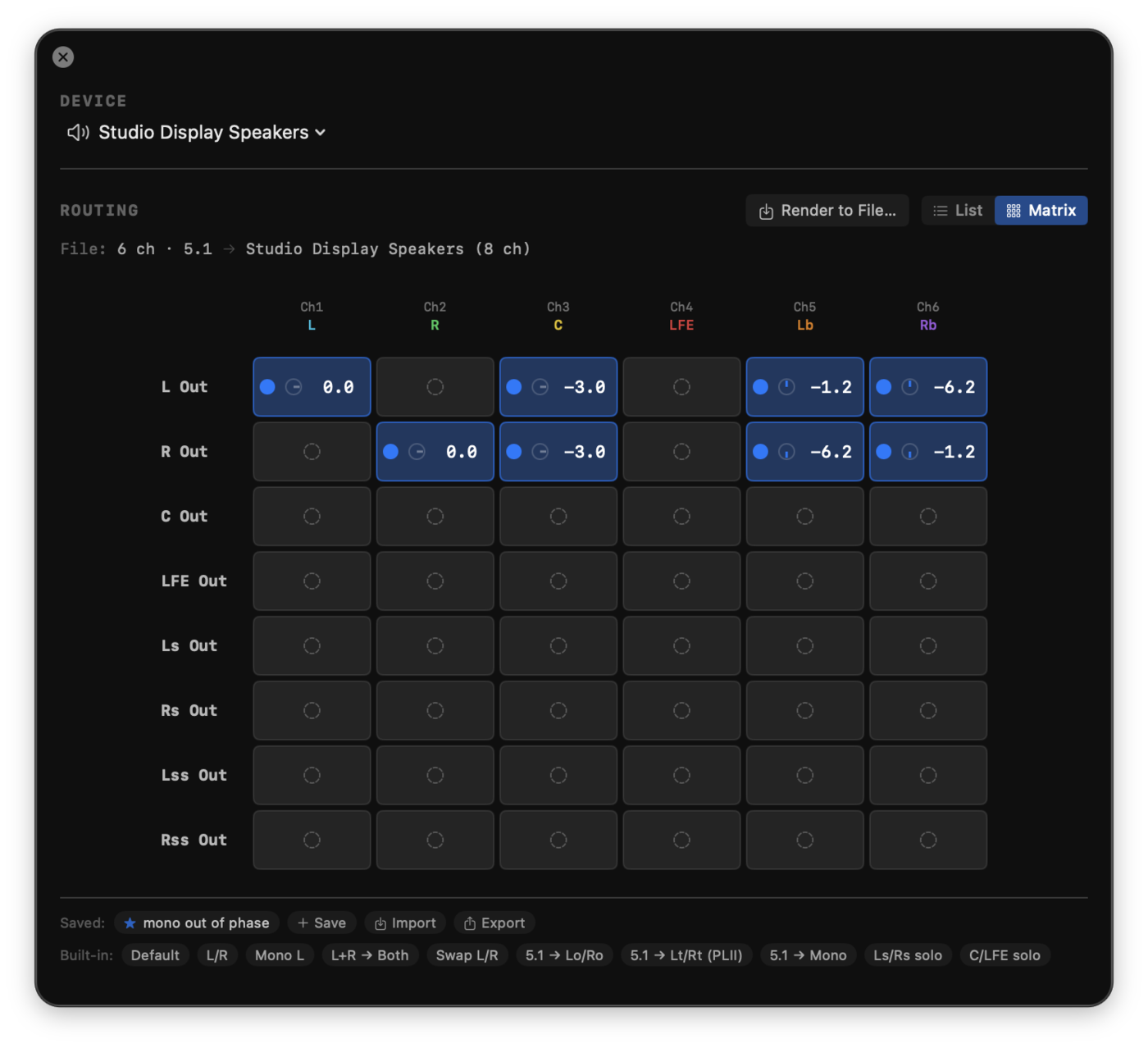
The preset bar applies a complete mapping in one click, filtered to the presets that fit the current file and device channel counts. Basic (any stereo file): L/R, Mono L, L+R to both, Swap L/R. 5.1 downmix (6-ch file): Lo/Ro (BS.775 / Dolby stereo), Lt/Rt (Pro Logic II, same-side surround at −1.2 dB, opposite-side inverted at −6.2 dB), 5.1 to Mono. 7.1 downmix (8-ch file): 7.1 to Lo/Ro, 7.1 to Lt/Rt, 7.1 to 5.1. Applying a preset is destructive to the current routing: it overwrites every output and mutes the ones it doesn't address.
4 · Measure PRE or POST
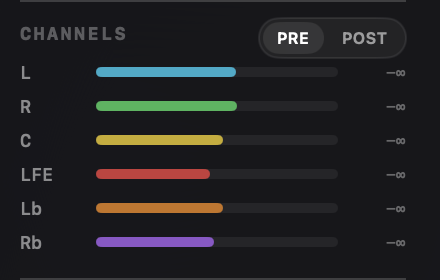
A PRE / POST toggle in the Channels sidebar header decides which signal feeds the loudness measurement. PRE is the raw, unrouted file, the loudness of what's on disk, and what you want most of the time. POST measures after routing and gain, so when you've reduced channel count with the matrix (a 5.1 → stereo fold, say) you read the loudness of the resulting stereo pair.
5 · Render the downmix to a file
When the fold-down sounds and measures right, Render to File… (in the Routing section header) writes it out, so the downmix is a deliverable, not just an audition. Every per-route gain, polarity, and Pro Logic II ±90° phase shift is applied exactly as you hear it, computed offline. Only the outputs you've actually routed are written: a 5.1 → stereo downmix renders a 2-channel file, not eight channels padded with silence. It saves as a new file (WAV, or CAF when the layout can't be stored in WAV order) and never overwrites the source.

Standard coefficients, not guesses

The fold-down presets follow the published specifications. Coefficients follow ITU-R BS.775-3: the −3 dB factor on summed channels is 1/√2, the equal-power gain for correlated channel summation. The Pro Logic II coefficients (−1.2 dB on the same-side surround and −6.2 dB on the opposite-side surround, with phase inversion applied to the left total) match the Dolby specification.

The 7.1 → Lt/Rt preset applies the same polarity rule to both the side and back surround pairs, so a 7.1 master folds down with the surrounds matrix-encoded correctly rather than summed flat. Because the matrix exposes per-route polarity directly via the ϕ glyph, you can also flip a single channel by hand for a quick phase check without touching a preset.

A Test preset (6-ch file) solos Ls/Rs or C/LFE so you can inspect surround content in isolation, useful for confirming what's actually in the surround channels before you trust the fold.

Any 7.1 channel order is measured correctly. Loudness weighting follows ITU-R BS.1770 applied per channel by identity (front channels at full weight, surrounds at +1.5 dB, LFE excluded), so the integrated-loudness number is right whether a 7.1 file arrives in the standard SMPTE order (L R C LFE Ls Rs Lb Rb) that 7.1 WAV uses or in a different layout such as AAC's C Lc Rc L R Ls Rs LFE. 5.1 and smaller layouts are reordered to canonical order on load, and channel-order auditing and the downmix presets work the same across every layout.

Save a routing, verify the result

Your own downmixes, shareable; channel order confirmed against the stereo pair you measure.

Above the built-in presets is a Saved row for your own routings. Save captures everything currently in the matrix: every output's sources, gains, and polarity flags, under a name you choose; saved presets only appear when a file and device with matching channel counts are loaded. Export writes all your saved presets to a Specula Routing Presets JSON file, and Import reads one back, appending any presets not already in your library (deduplicated by ID), so a fold-down you trust travels to a collaborator's machine intact. Right-click a saved preset for Rename, Export (just that one), or Delete. They persist across launches and survive future updates.

This is how you check channel order: route the surround master to your monitor layout, listen, and read the result. Switch the sidebar to POST after a fold-down and the integrated LUFS, true peak, and per-channel readings all reflect the stereo pair the routing produced, with the loaded file left untouched. The order is confirmed by ear and by number first; then, when the fold-down is right, Render to File… writes it to a new file as the deliverable, never over the source.

See it in Specula

The routing window with a 5.1 to stereo downmix set and a Render to File button in the header.
Render the downmix to a file. Only the routed outputs are written; the source is never overwritten.
The routing list view with typeable per-contribution dB values and built-in downmix presets.
Type exact gains. The list view sets each contribution in dB, with built-in downmix presets.
The PRE monitor toggle metering the source channels before routing.
PRE. Meter the source channels before routing.
The POST monitor toggle metering the routed output after the matrix.
POST. Meter the routed output after the matrix.

Confirm the surround mix before delivery

Specula is the pass between "the surround mix is done" and "it's delivered." It lets you audition the channel order and every fold-down against your own monitors, measure the downmix you'll actually ship, and render that downmix to a new file when it's right, without changing a sample of the source.