Audiobook delivery is judged in pieces. ACX - Amazon's spec, used by Audible and most distributors - takes each chapter as its own file, and each file has to clear the same three gates on its own: RMS loudness between -23 and -18 dB, true peak at or below -3 dBTP, and a room-tone noise floor at or below -60 dB RMS. A book that averages out fine across four hours tells you nothing about whether chapter 14 clears those gates by itself.
Open a finished book in an analyser and the headline reading is one integrated loudness figure for the whole file - the wrong altitude for this job. The thing that gets a submission sent back is almost never the average across the book; it is one chapter that drifted away from the rest.
What "consistent" means to a listener
Two chapters can both sit inside the -23 to -18 dB window and still be several dB apart. Both pass the hard gate; the listener still hears the jump at the chapter break and reaches for the volume. The gate is per file. Perceived consistency is across files. A book where every chapter lands near the same loudness sounds professional; one where chapter 7 runs 4 dB hotter than its neighbours sounds like it was assembled from different sessions, which it usually was.
So there are two questions, not one. Does each chapter clear the ACX gates on its own, and does each chapter sit close to the rest of the book. A single integrated number for the whole file answers neither.
Finding the chapters
Chapter mode segments the file at its silences. Audiobook chapters end in silence by construction - the producer wants the listener to register that a chapter ended - so the boundaries are already in the audio. Specula scans for silences longer than the minimum duration (default 2 s) below the silence threshold (default -55 dB); the audio between two silences becomes a chapter.
Two rules make the detected boundaries match what a human would mark. Runs of content shorter than 1 s get absorbed into the surrounding chapter, so a single cough between paragraphs doesn't open a spurious one-second "chapter". And leading and trailing silence folds into the first and last chapters, so chapter 1 always starts at 0, the last chapter always ends at the file's end, and the ribbon covers the whole timeline with no gaps at the edges.
Detection is a starting point, not the verdict. Every boundary is a draggable marker on the waveform: add one at the playhead, remove one to merge two chapters, rename a chapter inline. If you already have a chapter list, import it as a JSON sidecar instead of detecting from scratch.
The number that matters: deviation from the median
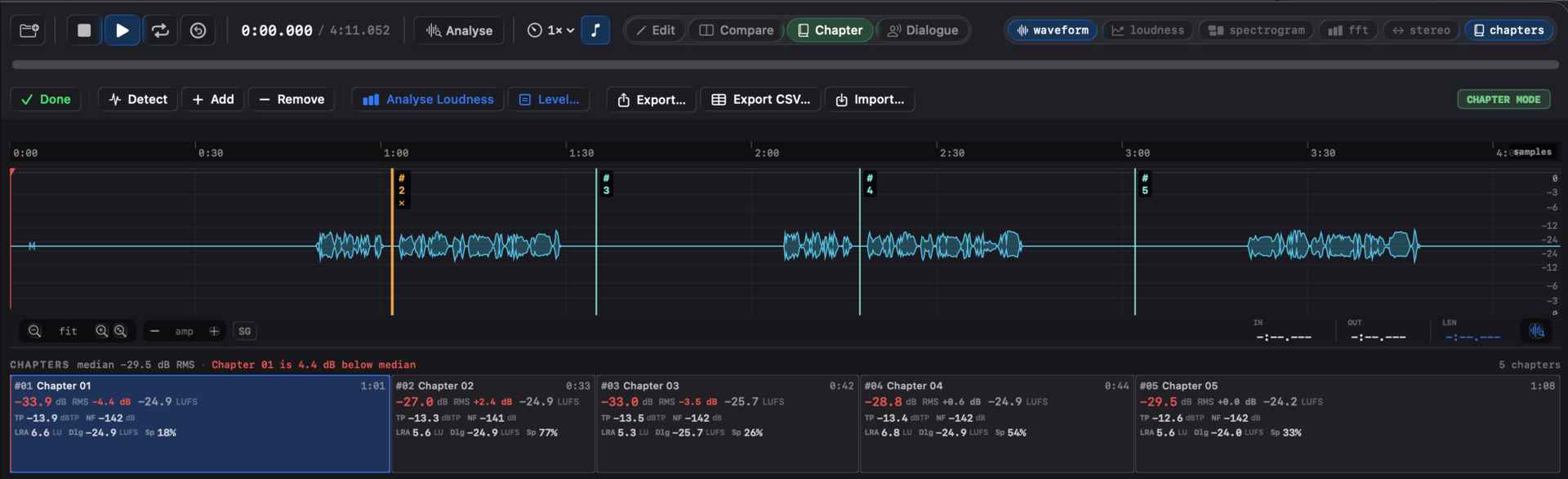
Click Analyse Loudness and Specula runs a BS.1770 pass on every chapter and a plain-RMS pass for the ACX gate. The ribbon then shows, per chapter, its RMS, its integrated LUFS, and the useful part: how far its loudness sits from the median of the whole book. The book's own centre is the reference, so the flag is relative to the material in front of you, not to an arbitrary target.
Chapters more than the threshold from the median - default ±2 dB on RMS, or switch the metric to integrated LUFS and it's ±2 LU - tint red, and the headline names the worst one. Fix that chapter, re-analyse, watch the spread close up.
| Chapter | RMS | Deviation from median |
|---|---|---|
| 01 | -33.9 dB | -4.4 dB |
| 02 | -27.0 dB | +2.4 dB |
| 03 | -33.0 dB | -3.5 dB |
| 04 | -28.8 dB | +0.6 dB |
| 05 | -29.5 dB | 0.0 dB |
Median -29.5 dB RMS. Chapter 1 is the furthest out at 4.4 dB under; with the default ±2 dB flag, chapters 1, 2 and 3 all trip it. The absolute numbers here belong to a short test file, not a finished book - the point is that the spread is visible at a glance, chapter by chapter, before anything ships. Chapters shorter than 10 s skip the gated BS.1770 measurements, because the gating needs that minimum, but their RMS and peak still populate, since those are valid at any length.
The deliverable
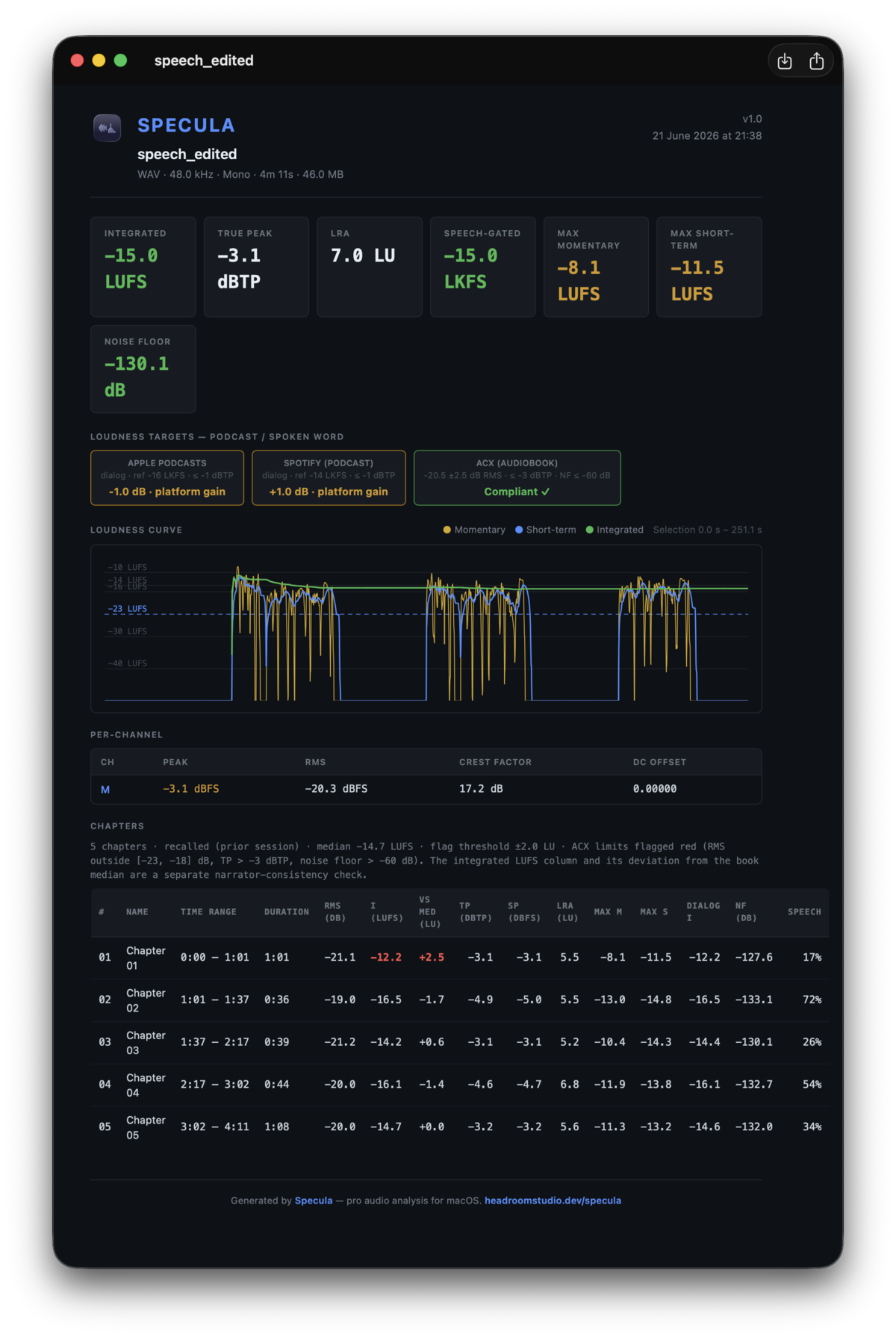
The report carries the table out of the app. The PDF, JSON and CSV exports each gain a Chapters section: every chapter's RMS, integrated LUFS, true peak, noise floor and deviation, with cells turning red on the three ACX gates - RMS outside -23 to -18 dB, peak over -3 dBTP, floor over -60 dB RMS. Hand it to the producer and the chapter that needs another pass is already circled.
Revisions keep the layout
Audiobook revisions are routine: a producer flags a chapter, the narrator re-records, you deliver v2 of the file. The chapter boundaries don't move between versions - only the audio inside one of them does. Export the layout as a JSON sidecar and re-import it onto the new file, so you are not re-marking forty boundaries by hand every time a single chapter comes back.
Where it sits next to the ACX preset
Chapter mode is the per-chapter half of audiobook QC. The other half is the per-file verdict: Specula's Loudness Targets panel carries an ACX preset (-20.5 dB RMS ±2.5, peak at or below -3 dBTP, plus the speech-gated noise floor) that judges the file as a whole. The preset tells you the book is in spec; Chapter mode tells you which chapter isn't. A submission can pass the first and fail the second, which is exactly the case worth catching before upload.
That noise-floor gate is its own measurement - it reads the room tone in the gaps between phrases, and it is the gate that catches narrators out, because you can't hear it while you record. That's the next post.
Chapter mode is part of Specula 1.0. $99.99, one-time purchase; requires macOS 14 (Sonoma) or later.