Videre app icon

In development

Videre

A native macOS inspector for people who work on video, not just with it. Open a raw YUV dump with no header or an encoded file, display it color-correctly in SDR and HDR, read every scope and every metadata block down to the bitstream fields, and compare two encodes with the metrics that decide codec shootouts. Then act on what you found: repair the metadata without re-encoding, fix defective pixels with verified surgical edits, split the clip into shots, and check the file against a delivery spec. And when a measurement needs material with a known answer, ⌘G writes it: 25 patterns computed for the exact format, matrix, range and depth you are checking.

macOS Raw YUV PQ & HLG Dynamic HDR metadata 3D gamut scope VMAF Bitstream inspector Metadata repair Non-destructive editing Test-signal generator Delivery specs Scriptable CLI
Coming soon Get in touch
one-time purchase · macOS 14+

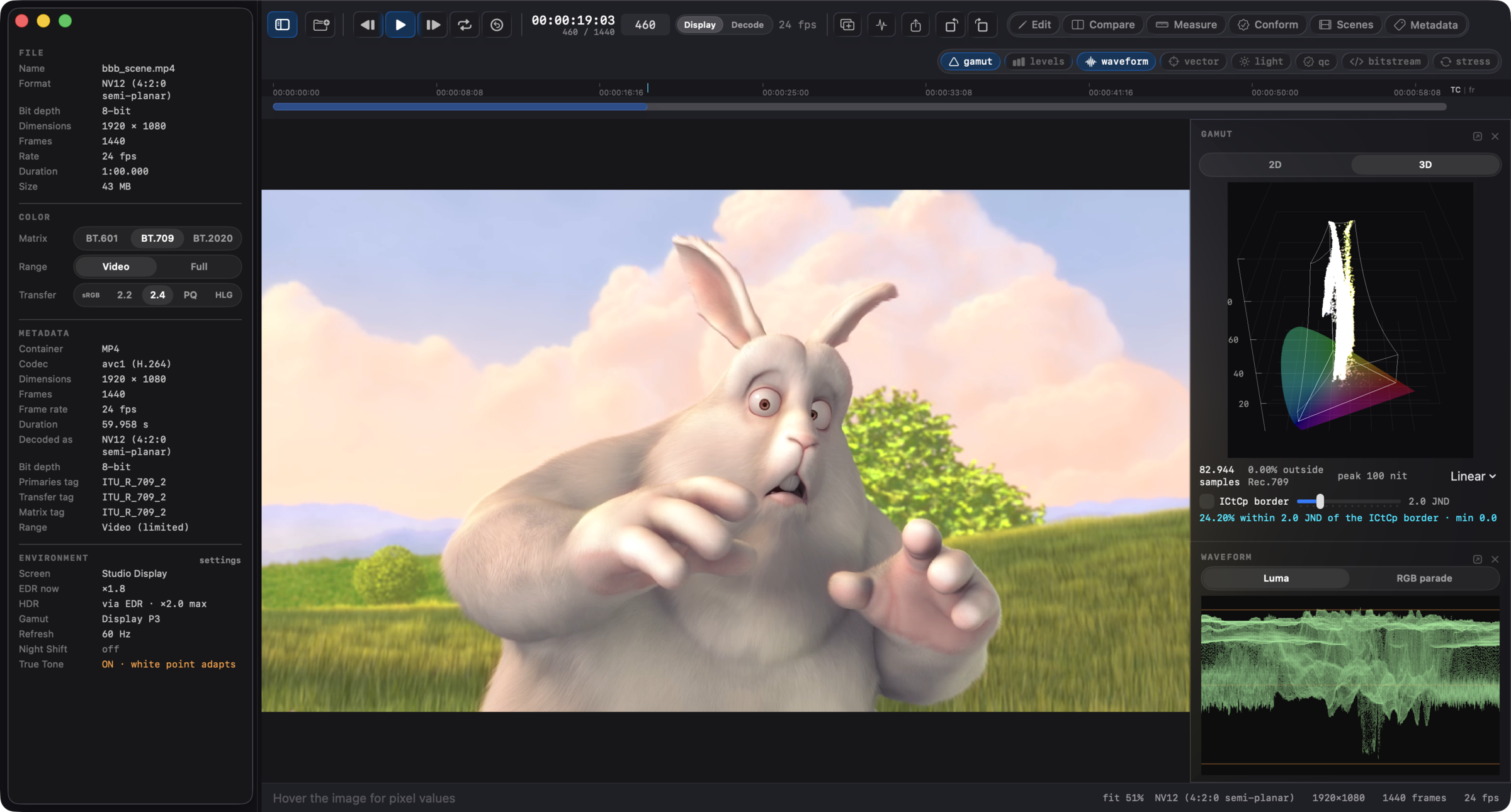
Videre's main window: color-managed viewer, interpretation side panel, 3D gamut cloud and waveform scopes.
The whole frame, in numbers and in pictures. Color-managed viewer, live interpretation controls, and stacked scopes. Footage: Big Buck Bunny (CC) Blender Foundation.

Why Videre

Players show you a picture. Videre shows you the file: what the pixels are, what the metadata claims, and what survives an encode.

A raw YUV dump has no header; nothing in the file says 1920×1080, 10-bit, BT.709. And tagged files lie: a BT.601 clip marked BT.709 looks almost right, which is worse than wrong. Videre opens headerless files through a parameter sheet with a size guesser and filename hints, and every file, tagged or not, gets live interpretation controls: matrix, range, and transfer are pills you flip while the frame re-renders, with an amber marker whenever your choice diverges from what the file declares.

"Encoder A looks better" is not a result. Videre loads two sources into an A/B session with side-by-side, flip, wipe, and difference views, a temporal offset for misaligned clips, and per-frame PSNR, SSIM, MS-SSIM, VMAF, CAMBI, and ΔE metrics with a graph and a jump-to-worst-frame button. The numbers cross-validate against the reference implementations, so they hold up in a report.

HDR10+ scene metadata, VUI color tags, container boxes: a player consumes them silently or ignores them. Videre reads them out, per frame, searchable by field name, and exports them as JSON. When a clip looks wrong on one TV and fine on another, the answer is usually in a block nobody rendered visible.

And when the file itself is the problem, Videre writes: wrong tags are repaired without re-encoding, defective pixels are patched with exact code values, and every write goes to a new file that must pass verification before the save succeeds. The original is never modified, on any path.

The signal path

any source raw · y4m · MP4 interpretation · live pills scopes · waveform / vector metadata · dynamic HDR bitstream · NALs / GOP compare · PSNR / SSIM / ΔE color-managed view SDR + HDR via EDR JSON · CSV · CLI frozen report schema any source raw · y4m · MP4 interpretation · live pills scopes · waveform / vector metadata · dynamic HDR bitstream · NALs / GOP compare · PSNR / SSIM / ΔE color-managed view SDR + HDR via EDR JSON · CSV · CLI frozen report schema
The signal path. A source decodes once through the interpretation you set; the view, the scopes, the metadata readout, the bitstream view, and the compare metrics all read that same frame, in the window or from videre-cli. A generated test clip enters the path at the same point a file does.

Six modes

Inspecting is the default. Each mode adds one job on top of it, on ⌘1 through ⌘6, and they share every scope and the one decoded frame.

Edit (⌘1)
Surgical, measurable repair of raw video: legalize levels in codes, nits, or RGB, swap or neutralize planes, bake a range conversion, patch pixels with exact values, interpolate over dead pixels and dropped lines, crop / pad / rotate, cut and trim. Ops stack non-destructively, every scope reads through the stack, and the export verifies every frame byte-for-byte. Recipes replay from the command line.
Compare (⌘2)
The A/B session: side-by-side, flip, wipe, and difference views, a temporal offset, and per-frame metrics. Detailed below.
Measure (⌘3)
Reads the part of the frame you point at: region statistics with jump-to-min/max, line profiles in codes or nits, a pixel ruler, a region histogram, and Scan Region to watch one window across every frame of the clip. Copy takes any readout as text or JSON.
Conform (⌘4)
A delivery spec becomes a checklist: one row per requirement, each failing row carrying the fix that resolves it, on the surface that actually performs it - a staged tag write, an edit-stack operation, or an output setting. Unmeasured rows skip honestly instead of passing quietly. HDR10, Rec.709, and mezzanine presets ship; your own specs sit beside them.
Scenes (⌘5)
One pass groups the clip into shots with per-shot light levels, complexity, legal levels, and flash-risk indication; cuts check against keyframes and against HDR10+ metadata boundaries. The cut list becomes a keyframe plan, chapters, markers, an EDL, or OpenTimelineIO - or drives an ffmpeg encode from the export window.
Metadata (⌘6)
Fix color and HDR signalling in both layers - container boxes and the coded stream - without re-encoding. Fixes stage into a reviewable plan and write once, verified. The fix catalog is further down this page.

Built for your workflow

Job-shaped paths through the same engine.

What it opens

Raw buffers straight from a codec under development, camera dumps, y4m pipelines, and finished deliverables.

Raw / headerless
Planar YUV at 8, 10, 12, and 16 bit in 4:2:0 / 4:2:2 / 4:4:4, semi-planar NV12/NV21/P010 class, packed YUYV / UYVY / v210, grayscale, and RGB orders. Custom resolutions and per-plane strides. A size guesser ranks candidate geometries from the file size; filename hints (1920x1080, p010, bt709 in the name) pre-fill the sheet.
y4m
YUV4MPEG2 streams including 10-bit variants, with header tags mapped to interpretation and chroma siting.
Encoded
MP4 / MOV / QuickTime through the system decoder: HEVC, H.264, ProRes, and AV1 where the Mac's decoder carries it, with frame-exact random access and edit-list handling. Files with in-band parameter sets (hev1 / avc3) decode through Videre's own VideoToolbox path.
Reinterpret
⌘F re-opens the current file with different parameters, keeping frame position and zoom. Wrong guess costs nothing.

Display

Color-managed viewer
BT.601 / 709 / 2020 matrices, video and full range, sRGB / gamma 2.2 / gamma 2.4 / PQ / HLG transfer, chroma siting. Conversion math is one implementation shared by the display shader, the pixel readout, and every scope, so what you see and what you measure never disagree.
HDR on EDR displays
PQ and HLG render through the display's extended dynamic range headroom. A Display section shows the current EDR headroom, a ±6 EV display-only exposure control, a 1,000-nit tone-map preview, and a clipping highlight for content brighter than the display can show.
Pixel-level inspection
Zoom to a pixel grid, hover for code values and converted RGB, nits readout on HDR content, a magnifier loupe, channel isolation (Y, Cb, Cr, R, G, B, alpha, and ICtCp components), rotation metadata honored, copy or save any frame as PNG.
Transport
Real-time playback that follows each frame's own duration, so variable-frame-rate files play with their true cadence; a timecode-and-frames counter; loop playback with a paintable range; and a Display / Decode order switch that walks the whole app through the coded frame order, reference frames first.

Scopes

Every analyzer toggles on a control-number shortcut, stacks in the inspector, and pops out to its own window.

Gamut
CIE 1931 chromaticity with the frame's pixel cloud, out-of-gamut and outside-P3 stats, and a rotatable 3D mode plotting chromaticity against luminance in nits, with gamut-volume outlines and a MaxCLL reference plane. Hover the diagram and matching pixels highlight in the image.
ICtCp border check
Flags colors sitting within a chosen ΔE ITP margin of the edge of the representable volume, where chroma subsampling and quantization push them out of range. Cyan overlay on the image plus a per-frame stat.
Carriage stress
Simulates a carriage on the current frame: YCbCr or ICtCp, 4:4:4 / 4:2:2 / 4:2:0, 8 / 10 / 12-bit, and renders a per-pixel ΔE ITP damage heatmap with stats. What the chroma path of an encode does to the frame, before any encoder runs.
Waveform & vectorscope
Luma and per-channel waveform, chroma vectorscope.
Levels
Per-channel histograms with min / max / mean and sub-black / super-white percentages.
Light levels
Measured MaxCLL / MaxFALL against the declared values, with staleness tracking and re-measure.
QC checks
Black frames, freeze runs, letterbox bounds, and ITU-T P.910 SI / TI over the whole clip. One Analyze pass (⇧⌘A) fills the light levels, the QC checks, and the Scenes shot list together, and every panel that reads it flags staleness with the same re-run notice.
HDR10+
ST 2094-40 per-scene metadata with a per-frame MaxSCL graph and tone-curve knee readout.

Bitstream & container

The layer below the pixels, readable without leaving the app.

Bitstream inspector
Header-level parsing of H.264, H.265, and AV1: parameter sets in full, SEI and metadata OBUs, slice and frame headers, grouped into per-frame access units that follow the playhead. Field names are the exact spec syntax-element names. Type a field name and search the whole stream for it.
Container inspector
The ISO base media box tree (MP4 / MOV / HEIF): sample tables, edit lists, color boxes, codec configuration records, HEIF item structure, encryption signalling, DASH indexes. Memory-mapped, so a multi-gigabyte file opens instantly.
Change tracking
Step frames with change-highlight on and any field that differs from the previous frame renders amber with its old value, so a drifting HDR10+ tone curve or a mid-stream parameter-set change is visible at a glance.
JSON export
The full parse, every frame, machine-readable.

Metadata repair

Repair without re-encoding: the tags change, the pixels stay untouched. See the workflow →

Metadata mode (⌘6)
Rewrites the color tags (primaries, transfer, matrix, range), the SMPTE ST 2086 mastering display volume, and the MaxCLL / MaxFALL content light level of an MP4/MOV without re-encoding - in the container boxes, the coded stream's own signalling, or both, so the two layers agree after a repair. Fixes open pre-filled with the file's current tags, with BT.709 / BT.2020 PQ (HDR10) / BT.2020 HLG presets and any H.273 code point accepted. The catalog goes on: chroma siting, aspect ratio, HLG compatibility, stripping dynamic HDR metadata, QuickTime compatibility for in-band files, fast start, edit-list repair, and per-field expert edits down to the parameter sets.
Staged, then verified
Edits stage into a reviewable plan first - staged values render inline next to the file's current ones, with full undo. Write Metadata Copy writes the whole plan to a new file; the original is never modified, and the save succeeds only after the output passes verification: video and audio data byte-identical to the source, tags reading back exactly, file re-opening.
videre retag
The same repair from a script: presets, an x265-style master-display string, MaxCLL / MaxFALL, remove flags, and per-track selection.

Compare & metrics

Two sources, one verdict: aligned views for the eyes, cross-validated metrics for the report.

Load a reference and a distorted version, even in different pixel formats or transfers; each side converts under its own interpretation. View them side-by-side, flip on a key, wipe with a draggable divider, or as a difference image with channel, heatmap, and binary styles. A temporal offset control lines up clips that don't start on the same frame.

Metrics run per frame with a chart, sequence aggregates, and a jump-to-worst-frame button: PSNR (matching the ffmpeg filter's conventions exactly), SSIM and MS-SSIM (the canonical definitions), VMAF and CAMBI (Netflix's libvmaf, statically linked), and ΔE2000 / ΔE ITP color difference. Results export as JSON and CSV with a frozen report schema.

The run is progressive: numbers land in the panel frame by frame, the frame on screen is measured first, and cancelling keeps everything measured so far. Measure Frame takes just the pair in front of you, and an Auto toggle measures every frame you step to - scrubbing through a suspect region fills in its chart as you go.

Signal generator

⌘G writes the clip you measure against: patterns computed for the format under test, carrying codes you know before the file goes anywhere.

25 patterns: color bars, HDR bars, a 24-patch ColorChecker-style chart, conversion probes labelled with the codes they should carry, ramps and bit-depth ramps, PLUGE, a range checker, gamut sweeps and out-of-gamut marker pairs, zone plates, gratings, checkerboards, a chroma-siting probe, graticules, PQ stairs, luminance windows, HDR grey ramps, and a temporal set covering motion, cadence, drop detection, flash sequences and noise. Overlays compose on top: a frame counter with a machine-readable strip, text labels, a 1-pixel border with lettered corners, and a centre cross. Several segments in one clip make a scene-cut test with boundaries you already know, and Scenes mode reads them back. See the workflow →

Computed, not stored
Every value is computed for the format, matrix, range, bit depth and chroma siting you picked, through the same color and transfer math the scopes measure with. 75% white lands on 721 at 10-bit narrow range and 2884 at 12-bit, and a 1000-nit stair tread agrees with a 1000-nit legalize ceiling.
Chroma where the file says it is
Each plane is rendered at its own sample position, so 4:2:0 chroma sits where the declared siting puts it instead of being filtered down from a 4:4:4 picture. The chroma-siting probe makes the quarter-pixel offset visible, and that offset is what separates the three sitings.
Verified on the way out
Output is raw or y4m. Every written frame is read back off disk and byte-compared against a freshly rendered reference before the write reports success, and the readout states what that proves: the bytes landed intact, not that the pattern was the one you meant.
Reproducible
The same specification always produces the same bytes, so two runs a month apart are byte-identical. The JSON receipt carries the specification that made the file: feed a saved receipt back and you get that file again.
Fourteen presets, and videre generate
SMPTE-style bars, BT.2111-style bars in HLG and PQ at UHD, a PQ stairs ladder, PLUGE, a range checker, a drop detector at 60p, a zone plate, a siting probe, a five-shot demo clip, a flash-risk fixture. The command line takes the same preset names, the same pattern parameters, or a full spec file, so a fixture regenerates in CI.
Straight back into Videre
A generated clip is a source like any other: every scope, compare with metrics, and the conform check read it. Preview in Videre writes the current spec to a temporary file and opens it, so the scopes measure the real thing rather than the window's thumbnail.

Automation

videre CLI
Ten subcommands: generate, inspect, compare, bitstream, container, retag, edit, verify, conform, scenes, built on the same engine as the app, so scripted QC gets identical numbers. videre verify runs the delivery checks and videre conform gates against a spec, each exiting nonzero on a failure, so a pipeline can block an upload. JSON reports with a stable, versioned schema. Ships inside the app bundle with an Install Command-Line Tool menu item.
Shortcuts & Finder
Three Shortcuts actions: Inspect Video File and Compare Video Files return the JSON reports, Verify Video File returns a pass/fail verdict a Shortcut can branch on. In Finder, right-click two renders to compare them in Videre, or one file to write its inspect report to Downloads.

Cross-validated

A measurement tool is only as good as its references. Videre's test suite pins its numbers to external implementations, not to itself.

PSNRMatches ffmpeg's psnr filter to the printed precision: average, min, max.
VMAF · CAMBIGated against the vmaf reference CLI built from the same Netflix release.
HDR10+ST 2094-40 parsing validated against hdr10plus_tool output.
ContainerBox decoding compared field-for-field with GPAC's mp4box and libheif's heif-info.
BitstreamParameter-set parsing checked against ffprobe, mediainfo, and known encodes from x264, x265, and SVT-AV1.
Color mathBT.601 / 709 / 2020, BT.2100 PQ and HLG, BT.2124 ΔE ITP, CIEDE2000 pinned to published test values; the display shader is tested per-pixel against the CPU reference.

Requirements

macOS
Sonoma 14.0 or later.
Hardware
Any Mac that runs macOS 14. HDR rendering uses the display's EDR headroom; an XDR or recent MacBook Pro panel shows PQ and HLG at meaningful brightness.

All processing is local. Videre never transmits your video anywhere.

Status

Videre is in development at Headroom Studio, the same one-person shop behind Specula, Audita, and Lyra. The analysis engine, scopes, inspectors, and compare metrics described above are built and under test; licensing and the first public release are being prepared.

Questions, or a workflow you want covered? hello@headroomstudio.dev.

Screenshots use the Blender Foundation open movies Big Buck Bunny (© 2008 Blender Foundation / bigbuckbunny.org) and Tears of Steel ((CC) Blender Foundation / mango.blender.org), both CC-BY.